
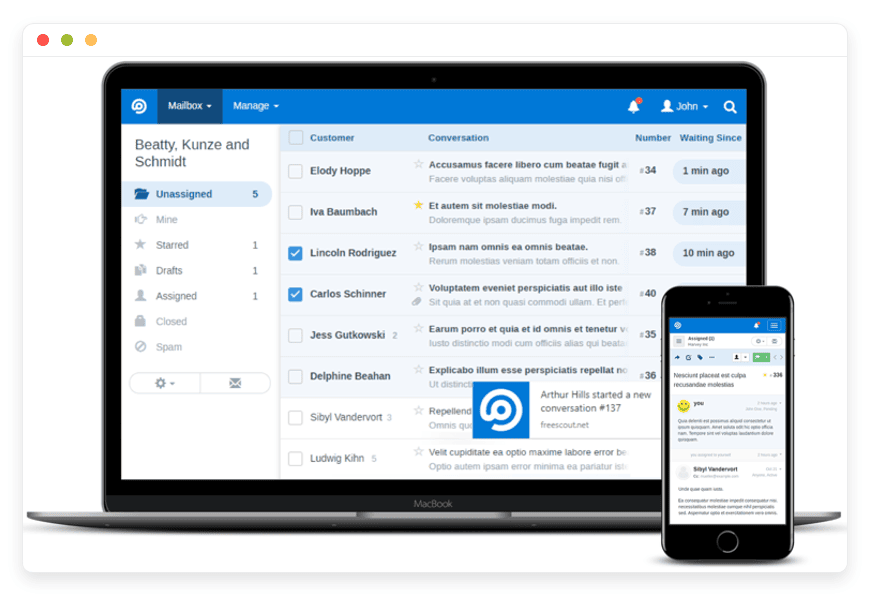
Managed FreeScout Hosting: The Smart Alternative to Help Scout
TL;DR: The Quick Answer
If you need a professional help desk but hate the "per agent" pricing of big SaaS tools, FreeScout is your answer. It is powerful, flexible, and free to use. However, managing the server infrastructure yourself requires significant technical skill. Managed FreeScout Hosting gives you the software without the stress.
Professional Help Desk: A full-featured shared inbox that organizes chaos.
Cost Effective: No monthly fee per user on the software side. You stop paying penalties for growing your team.
Mobile Ready: Official iOS and Android apps allow support on the go with real-time push notifications.
Modular Power: Extend functionality with official modules for CRM, Chat, and integrations.
Zero Maintenance: DANIAN handles updates, security, background jobs, and backups.
Instant Start: Get running in minutes, not hours.
Introduction
Customer support is the heartbeat of any business, but it is also where the most chaos occurs. When you first start, a shared Gmail password or a simple forwarding alias works fine. But success breaks these systems.
As soon as you have two or three people answering emails, the cracks appear. Emails get missed. Two people answer the same ticket with contradictory information. You have no idea how many emails are unresolved at the end of the day. You find yourself shouting across the office (or on Slack), "Did anyone reply to that guy about the refund?"
Big platforms like Zendesk or Help Scout solve this problem beautifully. They offer organization, collision detection, and reporting. But they have a business model that punishes your growth. They charge you a steep monthly fee for every single support agent you add. If you hire summer interns or temporary support staff, your bill explodes.
FreeScout is the perfect solution. It offers a clean, professional interface that looks and feels like standard email but works like a powerhouse help desk. It removes the financial barrier to organized support.
But here is the catch: running it yourself is a second job. FreeScout is a complex PHP application that relies on background workers, cron jobs, and specific server extensions to function. If your server configurations are slightly off, emails stop arriving. If you miss a security patch, your customer data is at risk.
That is where we come in. DANIAN provides the invisible infrastructure. We handle the server, the security, and the uptime. You just log in and help your customers.
What is FreeScout?
FreeScout is a super lightweight, open-source help desk written in PHP (Laravel). It was created to provide a genuine, self-hosted alternative to Help Scout. In fact, if you have used Help Scout, FreeScout will feel immediately familiar. This is intentional. The transition for your team is seamless because the UI patterns are identical to the industry standard.
The creators built it with a specific philosophy: a help desk should not feel like a complex database. It should feel like email. Many enterprise tools force your customers to log into a "portal" to view their tickets. FreeScout rejects that. To your customer, the interaction is 100% email. To you, it is a highly organized dashboard.
Why is it trending?
People are tired of bloated software. FreeScout is trending because it is fast, privacy-focused, and breaks the "pay-per-seat" business model. In an era where every SaaS tool wants $20/month per user, FreeScout stands out as a tool that lets you scale your team from 2 agents to 200 without your software costs rising by a single cent. It puts you back in control of your communication channels without draining your budget.
Why Choose Managed FreeScout Hosting?
It is tempting to think, "It's open source, I'll just put it on a cheap VPS."
While possible, hosting FreeScout requires specific server configurations to run smoothly. Email delivery is the hardest part of modern web hosting. If your background processes (cron jobs) fail, your customers' emails sit in limbo, fetched from the server but never appearing in your dashboard. If your PHP memory limits are too low, attachments will crash the system.
When you choose managed hosting, you bypass these risks. You get a system that is tuned for Laravel applications. Your emails arrive on time. Your attachments load instantly. You get the freedom of open-source software with the reliability of a paid service. You are paying for the peace of mind that your support channel is always open.
Key Features of FreeScout
FreeScout packs a serious punch. It strips away the clutter found in enterprise tools and focuses on what actually resolves tickets. Here is a deep dive into what makes this software so effective.
Unlimited Conversations and Agents
This is the headline feature. Most help desks limit how many people can answer emails unless you pay more. FreeScout does not. You can have unlimited users, unlimited tickets, and unlimited mailboxes. This is critical for growing teams who need to add temporary support staff during busy seasons (like Black Friday) without navigating complex billing upgrades.
The "Invisible" Ticket System
FreeScout operates on the principle that support should feel human. When you reply to a customer, they receive a standard email. There are no "Please login to view this reply" links. There is no "## Do not write below this line ##" clutter unless you want it. This improves the customer experience significantly, making them feel they are talking to a person, not a robot.
Seamless Email Integration
The software connects directly to your email provider via IMAP and SMTP. This means you are not locked into a proprietary messaging system. Whether you use Google Workspace, Outlook, or a custom mail server, FreeScout fetches the email and presents it in the dashboard. If you decide to leave FreeScout later, you still have all your emails in your original email account.
Official Mobile Apps
Mobile support is often an afterthought in open-source projects, usually relying on clunky third-party apps or responsive web views. FreeScout is different. It offers well-maintained, official mobile applications for both iOS and Android.
Push Notifications: Get alerted instantly when a new ticket arrives or a customer replies.
Full Functionality: You can assign conversations, add internal notes, and manage tags right from your phone.
Background Sync: The app keeps your inbox updated even when you aren't looking at it.
Powerful Modular Architecture
FreeScout keeps the core lightweight but allows you to expand via Modules. You only install what you need. This prevents "feature bloat" where the dashboard becomes slow and confusing.
Knowledge Base: Create a public-facing FAQ site that integrates with your support desk.
LDAP/Active Directory: For larger organizations needing centralized login management.
Auto-Replies: Set up complex rules for automatic responses based on hours or keywords.
Saved Replies: Pre-write answers to common questions. Agents can insert them with two clicks, ensuring consistent tone and accurate information across the team.
Internal Collaboration Tools
The hardest part of support is coordination. FreeScout solves this with internal tools:
Collision Detection: You can see who is viewing a ticket in real-time. If an agent is typing a reply, their avatar lights up, preventing double-work.
Internal Notes: You can leave yellow "sticky notes" on a conversation that only your team can see. This is perfect for coaching new staff ("Hey, next time check the refund policy first") or asking for help ("@DevTeam, is this a known bug?").
Tagging and Folders: Organize tickets by topic (e.g., #Billing, #Bug, #FeatureRequest) to keep the inbox clean.
Advanced Reporting
You cannot improve what you cannot measure. FreeScout provides detailed reports on your team's performance.
Volume Reports: See which days of the week or hours of the day are busiest.
Response Time: Track how long it takes your team to reply to a new ticket vs. resolving it.
Satisfaction Ratings: You can append a survey to your emails allowing customers to rate the support. FreeScout tracks this CSAT score over time.
Solutions per Industry
FreeScout is industry-agnostic, but its flexibility makes it a powerhouse for specific sectors. Here is how different industries use it to solve their unique problems.
eCommerce Brands
For online stores, response time directly correlates to revenue.
The Scenario: A customer emails asking about a shipping delay. In a standard inbox, this might get buried.
The Solution: You connect support@store.com to FreeScout. Using the WooCommerce or Shopify modules, your agents can see the customer's lifetime value and last 5 orders directly in the sidebar of the ticket.
The Workflow: An agent sees the email, checks the sidebar to confirm the order status, and uses a "Saved Reply" to apologize and issue a discount code. The ticket is tagged #ShippingIssue for management review. Speed is increased, and the customer is happy.
Digital Agencies
Agencies often manage support for multiple clients, which usually means logging in and out of different accounts.
The Scenario: You manage websites for 10 different clients. Each has a support@client-domain.com address.
The Solution: FreeScout allows you to set up separate "Mailboxes" for each client within a single installation.
The Workflow: You have one master login. The sidebar lists Client A, Client B, and Client C. You can assign specific agents to specific clients (e.g., your WordPress developer only sees tickets for the WordPress clients). You can even set up different email signatures for each mailbox, so the branding remains consistent for the end client.
SaaS Startups
Software companies deal with bugs, feature requests, and billing inquiries simultaneously.
The Scenario: A new bug is released. 50 users email in about the same error.
The Solution: FreeScout’s "Merge" and "Auto-reply" features save the day.
The Workflow: You create a "Saved Reply" explaining the bug is known and being fixed. You can bulk-select all 50 emails, merge them (or reply to them individually in bulk), and tag them as #Bug-Critical. Once the developers fix it, you can reply to the whole group instantly. This turns a PR nightmare into managed communication.
Educational Institutions
Schools and Universities have distinct departments (Admissions, IT, Housing) that need to stay separate but accessible.
The Scenario: The IT department is flooded with password reset requests during the first week of school.
The Solution: FreeScout allows for an IT-specific mailbox with LDAP integration for secure staff login.
The Workflow: Students email helpdesk@university.edu. FreeScout parses the subject line. If it sees "Password," it automatically assigns it to the Tier 1 Support folder. If it sees "WiFi," it goes to the Network folder. This automated triage saves the IT director hours of manual sorting.
Real Estate and Property Management
Property managers deal with time-sensitive maintenance requests and long-term lease negotiations.
The Scenario: A tenant emails about a leaking pipe at 2 AM.
The Solution: Mobile app push notifications and vendor collaboration.
The Workflow: The property manager receives a push notification. They open the FreeScout app, tag the email as #Emergency, and forward the thread directly to the plumber from within the app. They add an internal note: "Bill this to the landlord, not the tenant." The entire history of the repair is logged for future disputes or billing questions.
Non-Profits and NGOs
Budget is the primary constraint for non-profits. They often have many volunteers but cannot afford $50/user/month software.
The Scenario: A non-profit runs a fundraising campaign and needs 20 volunteers to answer donor emails for just one month.
The Solution: The unlimited user model.
The Workflow: The admin creates 20 accounts for the volunteers. They are given restricted access to only the "Donations" mailbox. They answer emails for the month. Once the campaign ends, the admin simply revokes access. Total cost for the software during this surge: $0.
Event Management
Events produce bursts of high-volume communication followed by silence.
The Scenario: A music festival is three days away. Attendees are panic-emailing about tickets.
The Solution: Auto-replies and keyword filtering.
The Workflow: The team sets up an Auto-Reply for the 72 hours before the event. "If you are emailing about tickets, please check this FAQ link first." This deflects 40% of the volume. For the rest, the team uses the "Conversation History" feature to see if an attendee has emailed five times about the same issue, allowing them to consolidate the replies and calm the customer down.
Healthcare (Medical Practices)
Clinics need to handle appointment scheduling and general inquiries with privacy in mind.
The Scenario: Patients email the front desk to reschedule appointments or ask about hours.
The Solution: A secure, centralized inbox that replaces the receptionist's personal Outlook.
The Workflow: The front desk staff shares a single FreeScout mailbox. When a patient emails, the "Collision Detection" ensures two receptionists don't reply at the same time. The "Search" function allows them to instantly find previous instructions sent to the patient. Note: While FreeScout is secure, always ensure your hosting and usage comply with local medical data regulations.
FreeScout vs Other Softwares
It is important to understand where FreeScout sits in the market compared to the giants.
| Feature | FreeScout | Proprietary Alternatives (Help Scout, Zendesk) |
| Cost Model | Flat hosting fee (Unlimited Agents) | High monthly fee (often $20-40-80/agent) |
| Data Control | You control 100% of the data | Data resides on their closed servers |
| Interface | Clean, Email-like, Minimalist | Often complex, cluttered, "Portal" style |
| Customization | Open Source Code access | Restricted API access only |
| Mobile App | Official iOS/Android (Free) | Included |
| Vendor Lock-in | None (Export anytime) | High (Difficult to migrate away) |
| Limits | Unlimited Mailboxes/Users | Tiers usually limit mailboxes/users |
The proprietary alternatives offer "Enterprise" features like AI-drafted responses or massive data-lake integrations. But for 95% of businesses, those features are overkill. FreeScout provides the core functionality—talking to customers efficiently—without the bloat.
Use Cases and Applications
FreeScout is flexible enough to handle various communication flows beyond just standard customer support. The "Shared Inbox" concept applies to many areas of business.
HR Help Desk: Create a hr@company.com mailbox. Manage internal employee requests, vacation approvals, and payroll questions securely. Use internal notes to discuss sensitive issues before replying to the employee.
Sales Pipeline: Use a shared inbox for sales@company.com. Assign incoming leads to different sales reps. Use the status feature to track who has followed up and who is "Pending." This acts as a lightweight CRM.
Vendor Management: Keep all communication with suppliers in one place. Your procurement team can see exactly what was promised by a vendor regarding shipping dates, avoiding the "I never said that" disputes.
Legal Inquiries: A secure channel for sensitive document handling where access logs are crucial. You can restrict this mailbox to only senior partners, ensuring confidentiality.
Developer Bug Tracking: Connect bugs@software.com. Developers can tag emails with issue numbers. When a bug is fixed, they can pull up all emails tagged with that bug ID and send a mass update.
How DANIAN Helps
We act as the "Quiet Enabler." You likely want to use FreeScout for its features, not because you enjoy configuring Nginx servers, debugging PHP extensions, or managing Redis queues. We handle the mess; you get the glory.
Fully Managed: We handle the hosting. Our team manages everything from initial setup to regular updates, security patches, and performance monitoring. Your software is always optimized without you having to lift a finger.
The "Cron Job" Headache: FreeScout relies heavily on background tasks to fetch emails and send notifications. If these stop, your help desk stops. We monitor these processes 24/7 to ensure they are running correctly.
Backup & Monitoring: We configure automated daily backups and store them securely off-site. If you delete a mailbox by accident, we offer a one-click restore to get you back in business.
SSL & Firewall: Secure by default. With cybersecurity threats on the rise, we take security seriously. From automated SSL updates to proactive monitoring and custom firewalls, we make sure your environment is secure 24/7.
Updates: FreeScout is active software with frequent releases. When a new version or a critical security patch drops, we apply it. You don't need to track GitHub releases or run composer update commands.
24/7 Monitoring: We watch the infrastructure. Issues like disk space spikes or memory leaks are often detected and resolved before you even notice them.
Guaranteed Performance: Downtime can be detrimental to your business. With our scalable infrastructure, we ensure consistent performance even as your ticket volume grows from 10 a day to 10,000 a day.
7-Day Free Trial: There is no risk. You can test the full capabilities of our managed hosting before committing.
Less setup. More development. Affordable from the start. Real help when you need it.
How to Get Started
Getting your professional help desk running takes less time than brewing a pot of coffee.
Visit danian.co and sign up for an account.
Select FreeScout from our extensive catalog of open-source apps.
Relax for a moment while DANIAN launches your software. We allocate the resources, install the dependencies, and secure the connection.
Log in, navigate to "System Settings," and connect your email via IMAP/SMTP.
FAQ
Is FreeScout really free?
The software source code is open-source and free to download. However, you need a server to run it on, which costs money. DANIAN provides the managed hosting service for a flat fee, so you don't have to manage the server yourself.
Can I use my own domain name?
Yes. You can easily connect your custom domain (e.g., support.yourcompany.com) to your DANIAN hosted FreeScout instance. We handle the SSL certificate generation automatically.
Does it work with Gmail, Outlook, or Office 365?
Yes. FreeScout connects via standard IMAP/SMTP protocols. If your email provider supports these (which Gmail, Outlook, Yahoo, and almost all others do), it works perfectly. There are also specific modules available to help connect with Office 365 if you use Modern Authentication (OAuth).
Are the mobile apps included?
Yes, the FreeScout mobile apps are free to download from the Apple App Store and Google Play Store. You simply enter your DANIAN URL and API key to connect them.
What happens if I need a specific module?
FreeScout has an internal marketplace for modules. You can install most of them directly from your FreeScout dashboard. Some modules are paid add-ons created by the FreeScout developers to support the project; you purchase these directly from them and activate them on your instance.
How does this handle attachments?
Attachments are stored on your DANIAN instance. We configure the server to allow for appropriate file sizes so your customers can send screenshots, PDFs, and documents without issues.
Can I migrate my data from Help Scout or Zendesk?
Yes, FreeScout has import tools and modules designed to help you bring your conversation history over from other major platforms so you don't lose your historical data.
Conclusion
FreeScout proves that you do not need to pay a fortune to deliver world-class customer support. It gives you the tools to be responsive, organized, and professional. It democratizes access to high-end support features, leveling the playing field between small businesses and large corporations.
But the tool is only half the battle; reliability is the other half. A self-hosted help desk that is offline is worse than no help desk at all.
Don't let server maintenance distract you from your customers. You should be focused on training your team and improving your response times, not worrying about PHP versions or Linux updates. Let DANIAN handle the infrastructure while you handle the tickets.


