
Managed Etherpad Hosting
TL;DR - Quick Answer
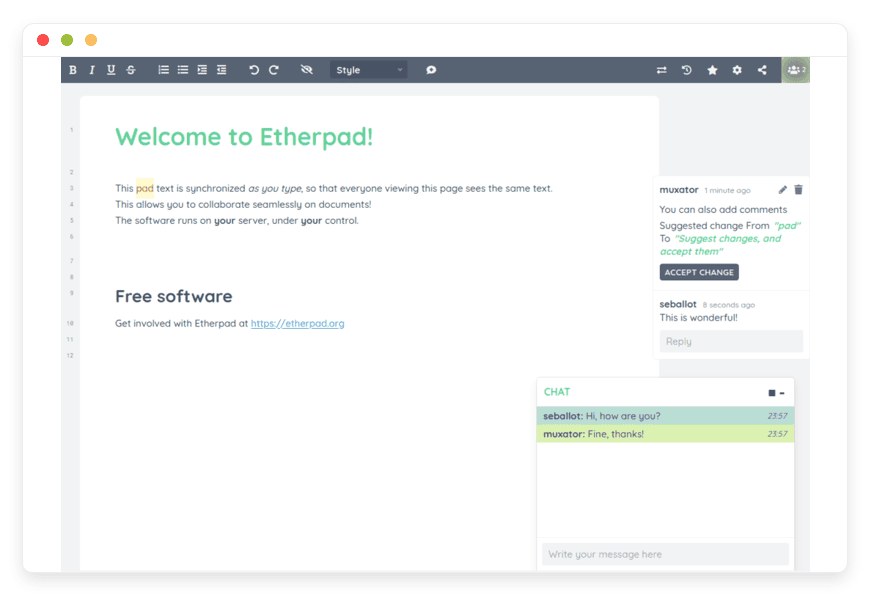
Etherpad is the original "really-real-time" collaborative editor. It allows multiple people to edit the same document simultaneously, seeing each other's changes instantly, character by character. However, maintaining the backend requires significant Node.js and database expertise, often turning a free tool into a costly maintenance burden.
Immediate Value of Managed Hosting:
Zero Latency Setup: Skip the complex npm configurations, dependency hell, and Docker container orchestration.
Production-Ready Database: We replace the default "DirtyDB" (which is prone to corruption) with robust, scalable SQL databases like PostgreSQL.
Security Hardening: Automatic SSL termination, secure headers, and isolated environments out of the box.
Plugin Management: Easily extend functionality with video calls, markdown support, and formatting tools without touching the command line.
Automatic Maintenance: We handle the patches and updates so your team never experiences downtime due to a deprecated library.
The Collaborative Standard (That’s A Pain to Host)
You know the drill. You need a document editor that doesn't spy on you, doesn't require a Google or Microsoft account, and allows your team to jam on ideas in real-time. You want a blank canvas where the only thing that matters is the text. Etherpad is the gold standard for this. It is lightweight, incredibly fast, and completely open-source.
But running it yourself is a second job.
To get Etherpad running reliably, you aren't just downloading a simple executable. You are managing a Node.js runtime environment. You have to configure a reverse proxy (like Nginx) to handle SSL certificates because browsers block insecure WebSockets. You need to set up a proper database because the default flat-file system will corrupt your data under the load of just a few simultaneous users. You have to monitor memory usage to prevent crashes during critical meetings.
Suddenly, your "free" collaborative tool costs you five hours of engineering time a week. That is time you aren't spending on your actual product.
DANIAN makes the infrastructure invisible. We provide fully managed, single-tenant Etherpad instances that are pre-configured for performance and security. You get the privacy and power of open-source without the terminal fatigue. We handle the dirty work; you just share the link and start writing.
What is Etherpad?
Etherpad is a highly customizable, open-source online editor providing collaborative editing in real-time. Originally built by AppJet and acquired by Google in 2009, its code was released as open-source, becoming the foundation for the "Operational Transformation" (OT) technology that powers almost every modern collaborative tool on the web today.
Unlike modern proprietary suites that are bloated with features you don't use—like AI assistants you didn't ask for or formatting toolbars that break your layout—Etherpad focuses on one thing: speed. It synchronizes text faster than almost any other editor.
When you type a letter in Etherpad, it doesn't wait for you to finish the sentence. It pushes that character to the server and out to every other connected client instantly. This creates a "multiplayer" feel that is distinct from the sluggish syncing found in heavier office suites.
Why is it trending?
Privacy and control are making a comeback. Teams are realizing that relying on "free" cloud giants means trading away their privacy. When you use a free hosted service, your data is often scanned to train models or serve ads. Etherpad runs on your terms, meaning your sensitive meeting notes, legal drafts, and creative brainstorms stay yours. It is the preferred tool for anyone who needs to verify exactly where their data lives.
Why Choose Etherpad?
The primary reason organizations switch to Etherpad is sovereignty. When you use a managed instance, you aren't renting a seat in a massive, multi-tenant software silo; you are utilizing a dedicated environment that isolates your data.
Auditability: Every single character stroke is saved. You can replay the entire history of a document like a movie. This is not just "version history"; it is a forensic record of the document's creation.
Extensibility: If the base editor isn't enough, the architecture is designed to be modular. There are over 290 plugins available to add tables, video calls, or markdown support.
No "Seat" Licensing: You don't pay per user. You pay for the server resources. This allows you to invite ten people or a hundred people to a document without your costs spiraling out of control.
Minimalism: It runs in the browser with zero client-side installation. It works on old laptops, tablets, and phones because the heavy lifting is done by the server (which we manage).
Key Features of Etherpad
Etherpad is deceptively simple on the surface but incredibly powerful underneath. It is built for power users who value function over form. Here is a deep dive into what makes it indispensable.
The Time Slider
This is Etherpad's killer feature, and it remains superior to almost every commercial competitor. Most editors save "snapshots" every few minutes or when you close the document. Etherpad records every keystroke as a "changeset."
The Time Slider interface allows you to drag a bar back to the very beginning of the document's creation. You can watch a replay of the writing process.
Forensic Auditing: Did someone delete a critical clause in a contract? You can find exactly when it happened and who did it.
Draft Recovery: Did you delete a paragraph 20 minutes ago that you now realize was actually perfect? You don't need to dig through "Version 1" vs "Version 2." You just slide back to minute 14:00, copy the text, and paste it back into the present.
Visualizing Thought: For educators and writers, seeing how a document evolved is often as important as the final result.
Really-Real-Time Editing (Operational Transformation)
"Real-time" is a marketing term abused by many software companies. Often, it means "updates every 5 seconds." Etherpad uses Operational Transformation (OT) logic to handle conflicts instantly.
If User A and User B type in the same sentence at the exact same millisecond, the server resolves the logic and pushes the correct combined state to both users without overwriting anyone's work. This happens so fast it feels instantaneous. The latency is practically non-existent, making it the only tool suitable for rapid-fire brainstorming sessions where four or five people are typing at once.
Authorship Colors
In a chaotic brainstorming session, knowing who wrote what is vital. Etherpad automatically assigns a distinct highlight color to every user who joins the pad.
Visual Clarity: You can scan a document and instantly see the distribution of work. "Pink" is John, "Blue" is Sarah.
Clear History: These colors persist in the Time Slider. You can see that Sarah wrote the intro, but John heavily edited the second sentence.
Toggle on/off: If the colors get distracting during reading, a simple eye icon clears the highlights, leaving just the text.
The Plugin System
Etherpad is designed as a kernel that you build upon. The plugin system interacts with the server-side hooks, allowing for deep modifications of how the software behaves.
ep_webrtc: Adds peer-to-peer video and audio calling directly into the sidebar. You don't need Zoom open in another window; you can talk and type in the same tab.
ep_markdown: For developers and technical writers, this plugin allows you to write in Markdown syntax, which the pad then renders or exports correctly.
ep_headings2: Adds proper H1, H2, H3 styling support, essential for structuring longer documents.
ep_comments_page: Adds a commenting system similar to Google Docs on the right-hand side, allowing for meta-discussion without cluttering the main text.
Import/Export Versatility
Data portability is not an afterthought; it is a core principle. You are never trapped in Etherpad.
Import: You can upload existing Word documents (.doc, .docx), PDFs, or text files to start a pad.
Export: When you are done, you can export your pad to HTML, plain text, Microsoft Word, PDF, or the native "Etherpad" format (which saves the history).
API Access: For advanced teams, the HTTP API allows you to programmatically extract the text of a pad. You could, for example, write a script that pulls the text from a specific pad every night and publishes it to a static website.
Solutions per Industry
Journalism and Media
The Pain Point: Breaking news moves fast. A newsroom might have a reporter in the field on a phone, a researcher at a desk checking facts, and a senior editor polishing the headline—all at the same time. Proprietary tools often lag or lock sections of the document when someone else is editing.
The Workflow: An Etherpad instance serves as the central "wire" for the story. The field reporter dumps raw notes and quotes into the body. The researcher verifies them and turns them into sentences. The editor shapes the narrative structure.
Why Managed: Newsrooms cannot afford downtime during a breaking story. They need a server that handles the spike in connections when the whole team jumps on a doc. Our managed hosting ensures the WebSocket connections remain stable even under high frequency updates.
Legal and Compliance
The Pain Point: Law firms often need to draft contracts with external parties (clients or opposing counsel). Sending Word docs back and forth via email creates "version hell" (e.g., Contract_Final_v3_REAL_FINAL.docx). Furthermore, placing data on public cloud servers can violate client confidentiality agreements or data residency laws.
The Workflow: The firm spins up a password-protected Etherpad. They share the link securely. Both parties negotiate the text in real-time. The "Authorship Colors" provide immediate visual verification of who added which clause.
Why Managed: Security is paramount. A managed instance from DANIAN allows the firm to rely on encrypted connections and secure backups without needing an in-house IT security team to configure Linux firewalls. Once the negotiation is done, the pad can be exported to PDF and securely deleted, leaving no residue on a third-party server.
Education and Research
The Pain Point: Teachers want students to collaborate on group projects or lecture notes. However, requiring thirty 10-year-olds to create accounts, remember passwords, and validate email addresses is a recipe for a wasted class period.
The Workflow: The teacher creates a pad and writes the URL on the whiteboard. Students open their laptops, type the URL, and are instantly in the document. No signup, no login, no friction. The teacher uses the Time Slider to grade participation, ensuring that one student didn't just do all the work at the last minute.
Why Managed: Schools often have strict budgets and limited IT staff. A managed solution provides the tool immediately without burdening the district's IT department with server maintenance.
DevOps and Incident Response
The Pain Point: When a server goes down or a critical bug is found, the engineering team enters a "War Room." They need a place to paste logs, share code snippets, and document the remediation steps in real-time. Slack or Teams channels are too noisy; valuable code snippets get lost in the chat scroll.
The Workflow: The team launches an "Incident Pad." As the investigation proceeds, engineers paste error logs and proposed fixes into the pad. It becomes the single source of truth for the incident. Because Etherpad handles code formatting well (monospaced fonts), it acts as a real-time collaborative IDE.
Why Managed: During an outage, the last thing you want is for your collaboration tool to also fail. You need an external, resilient notepad that is independent of your own internal infrastructure.
Creative Writing and Scripting
The Pain Point: Writers' rooms are collaborative environments where dialogue is pitched, shot down, and refined rapidly. Standard word processors are too rigid for the fluid dynamic of a writers' room.
The Workflow: A team of screenwriters uses Etherpad to "break the story." One writer focuses on dialogue, while another adjusts the scene descriptions. They use a plugin to format the text as a screenplay automatically. The low latency means the flow of creativity isn't interrupted by "Saving..." bars or sync errors.
Why Managed: Creative teams are rarely technical teams. They want the tool to work so they can focus on the art. They need the assurance that their scripts are backed up automatically every night.
NGOs and Activist Groups
The Pain Point: Activists organizing protests or sensitive campaigns require tools that protect their identity and do not log their metadata for advertising purposes. They often work in low-bandwidth environments.
The Workflow: An organizing committee uses a private Etherpad instance to draft press releases and coordinate logistics. The lightweight nature of Etherpad means it loads quickly even on poor 3G connections in the field.
Why Managed: Privacy is the product here. By using a dedicated instance, these groups ensure their data isn't sitting in a massive data lake owned by a tech giant. They get the protection of a secure infrastructure without needing a sysadmin in their ranks.
Event Management
The Pain Point: Conferences and live events produce a massive amount of information that needs to be captured instantly—session notes, Q&A logs, and logistical updates.
The Workflow: Event organizers set up public "Scribe Pads" for each talk. Attendees collectively take notes, creating a crowdsourced summary of the presentation in real-time. This engages the audience and produces a valuable resource for those who missed the session.
Why Managed: Events are temporary but high-stress. Organizers can spin up a managed instance for the week of the conference, handle hundreds of concurrent connections, and then archive the data afterwards.
Etherpad vs Other Softwares
It is important to understand where Etherpad fits in the landscape. It is not trying to be a "Office Suite" replacement; it is a specialized tool for text synchronization.
| Feature | Etherpad | Google Docs | Microsoft Word Online | Notion |
| Primary Focus | Speed & Privacy | Office Suite Features | Print Formatting | Knowledge Base |
| Open Source | Yes | No | No | No |
| Hosting | Self or Managed (You Control) | SaaS (Google Controls) | SaaS (Microsoft Controls) | SaaS (Notion Controls) |
| Account Required | No (Link based) | Yes | Yes | Yes |
| Real-Time Latency | Extremely Low (WebSocket) | Low | Medium | Medium |
| Version History | Keystroke (Time Slider) | Snapshot based | Snapshot based | Snapshot based |
| Data Privacy | High (Private Instance) | Low (Scanned for features) | Medium | Medium |
| Plugin Architecture | Modular (Server-side) | Limited Add-ons | Add-ins | Limited Integrations |
The Verdict: If you need to make a pretty brochure with complex layouts, use Word. If you need to build a database of tasks, use Notion. But if you need to write text together with zero friction and total privacy, Etherpad is unrivaled.
Use Cases and Applications
The versatility of Etherpad extends beyond just "writing docs."
Meeting Minutes: A shared scratchpad for capturing action items during Zoom or Teams calls. The "Author Colors" prove who agreed to which task.
Technical Interviews: A lightweight code editor (with syntax highlighting plugins) to test candidates. You can watch how they think and code in real-time without them needing to set up an environment.
To-Do Lists: Simple, collaborative checklists using the ep_tasklist plugin. Great for daily stand-ups.
Manifestos: Drafting public statements where version control and consensus are critical.
Translation Work: A translator and a native speaker can work side-by-side in the document, ensuring nuance is captured correctly.
How DANIAN Helps
We are the "Quiet Enabler." You want the tool, not the troubleshooting. We handle the mess of infrastructure so you get the glory of a working product.
Fully Managed: We handle the hosting.
Running Etherpad requires managing a Node.js process and ensuring it restarts if it crashes. It requires tweaking the settings.json file for optimal performance. Our team manages the initial setup, dependency installation, and runtime environment. Your software is always optimized without you having to lift a finger.Backup & Monitoring: Automated daily backups, stored securely.
The default Etherpad database is not meant for production; it is a flat file that can corrupt easily. We configure your instance with a robust PostgreSQL backend automatically. We perform daily backups and offer one-click restores. If you accidentally delete a pad, or if a rogue plugin breaks your instance, we can roll you back to a working state instantly.SSL & Firewall: Secure by default.
With cybersecurity threats on the rise, we take security seriously. We place your instance behind a secure reverse proxy with automatic SSL termination (HTTPS). From proactive monitoring to custom firewalls, we make sure your environment is secure 24/7. You don't need to worry about renewing certificates or patching OpenSSL.Updates:
Etherpad updates often include critical security patches for the underlying Node.js framework. We apply these patches and version upgrades without your intervention. You get the new features and the security fixes automatically.Guaranteed Performance:
Downtime can be detrimental to your business. Real-time collaboration is resource-intensive on the CPU. With our scalable infrastructure, we ensure consistent performance even as your user base grows and editing becomes frantic. We monitor the "heartbeat" of your instance and intervene if resources get tight.7-Day Free Trial: No risk.
We believe the best way to understand the speed of a private Etherpad instance is to feel it. Spin one up, invite your team, and see if it fits your workflow.
How to Get Started
Getting your private collaborative environment running takes less time than reading this blog post.
Visit danian.co: Go to our signup page.
Select Etherpad: Choose it from our extensive catalog of open-source applications.
Launch: Relax while our automated systems provision your dedicated server, configure the PostgreSQL database, and secure the connection.
Collaborate: You get a unique URL. Share it with your team and start writing immediately.
FAQ
Q: Do I need to pay for a license?
A: No. Etherpad is open-source software (Apache License). You are paying DANIAN for the managed hosting service, the hardware resources, the support, and the automated maintenance, not for the software code itself.
Q: Can I install custom plugins?
A: Yes. Etherpad has a rich plugin ecosystem. On a managed instance, you have access to the /admin interface where you can search for and install plugins to extend functionality. If you need a specific configuration, our support team can assist.
Q: Is my data compatible with Word or Google Docs?
A: Yes. You are not locked into the platform. Etherpad supports exporting to .doc, .pdf, .odt, and HTML. You can draft in Etherpad for speed and then move to Word for final formatting.
Q: How many people can edit at once?
A: This depends on the server resources. Our optimized instances handle small to medium teams (20-30 active editors) effortlessly. Etherpad is very efficient, but if you are planning a massive event with hundreds of simultaneous writers, please contact support for custom resource allocation.
Q: What happens if the server crashes?
A: We have automated monitoring that detects downtime instantly. Our systems will attempt to restart the service automatically. If the issue persists, our engineers are alerted. We typically resolve issues before you even notice them.
Q: Can I make my pads private?
A: Absolutely. While Etherpad defaults to open URLs, you can install authentication plugins or use the built-in access controls to require passwords or limit access to specific users.
Q: Does DANIAN read my data?
A: No. We provide the infrastructure. Your data is your own. We do not scan your text for advertising or analytics.
Conclusion
Etherpad remains the undisputed champion of lightweight, privacy-focused collaborative editing. It strips away the bloat of corporate office suites and gives you exactly what you need: a blank page that connects you to your team instantly. It is the tool of choice for those who value speed, data sovereignty, and open-source freedom.
But you shouldn't have to be a sysadmin to enjoy it. You shouldn't have to worry about Node.js versions, database connections, or SSL certificates.
Let us handle the servers, the databases, and the security updates. You just focus on the words.


