
Stop Wasting Time: The Definitive Guide to Managed Cubby Hosting
TLDR - Quick Answer
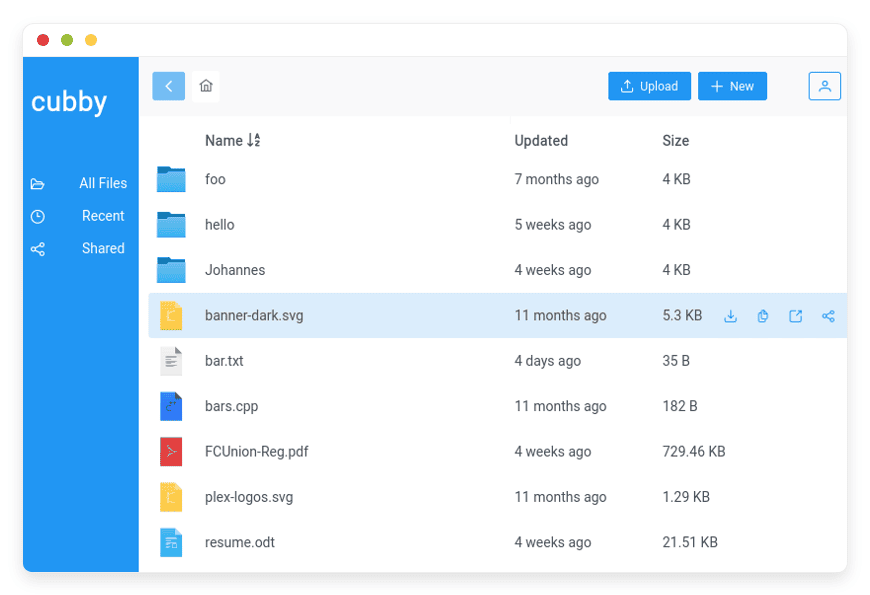
What is it? Cubby is a pure, painless file sharing app built for collaboration.
Why Managed Cubby Hosting? You get the full open-source software without the burden of server maintenance.
Immediate Value:
Share files instantly with internal teams or external guests.
View PDFs, images, and code directly in your browser.
Edit documents together using built-in markdown or office integration.
Mount your files directly to your computer using WebDAV.
Skip complex setup. Get running in minutes with DANIAN.
Introduction
File sharing should be simple. Your team needs a secure place to store assets. You need to send documents to clients fast. Standard tools often give you too much bloat. They force you into expensive monthly plans. They include confusing tools you never actually use.
Cubby solves this specific problem. It gives you a fast, focused file manager. It removes the extra noise. But running it yourself is a second job. You have to configure the server environment. You have to handle software updates. You must fix unexpected database errors and deal with security patches. Your time is valuable. You should spend it working on your business, not fixing servers.
This is where Managed Cubby Hosting comes in. DANIAN acts as your invisible infrastructure team. We handle the technical mess. You get a fast, secure file sharing platform without the headache.
What is Cubby?
Cubby is a collaborative file manager. It focuses purely on files and sharing. It strips away complicated extras. The software provides a friendly, zero-fuss experience. You can view, edit, and share files quickly.
The Cloudron team created Cubby. They wanted an open-source file sharing app that just works. They designed it to be lightweight and fast. The app supports OpenID for secure user access. It integrates smoothly with external office suites. Cubby is licensed under the AGPL 3 license. This ensures it remains completely free and open for everyone.
Why is it trending?
People are tired of heavy software suites. Many platforms try to do everything. They include chat, email, and task management. Cubby goes the opposite way. It does one thing perfectly. It handles files. Users love this pure focus. The clean interface makes finding files fast. Built-in viewers mean you do not have to download files to see them. You can view text, code, and media right in your browser. This speed and focus make Cubby highly popular right now.
Why Choose Cubby?
Choosing the right software changes how your team works. Heavy tools slow you down. They confuse new users. Cubby keeps things simple. It gives you open-source freedom. You control your workflow. You decide exactly how you share your files.
Many companies rely on proprietary platforms. These platforms limit your storage. They change their features without warning. They increase their prices yearly. Cubby frees you from these limits. It replaces complex proprietary suites with a clean, focused app. Hosting Cubby on your own terms gives you peace of mind.
You get all the essential tools. You can create public share links. You can restrict access to specific users. You can set up group folders for different departments. Cubby handles these tasks easily. You do not need a massive IT budget. You just need a tool that works. Cubby is exactly that tool.
Key Features of Cubby
Cubby packs powerful tools into a simple interface. Every feature improves how you work. We will explore the main features below in deep detail.
Flexible Sharing Options
Sharing files is the core of Cubby. You can share files with anyone. Internal team members get instant access. You can also create external links for clients. You can define these links as read-only or read/write. You decide exactly who sees what. This stops unauthorized access. It keeps your sensitive files safe. You do not have to email large attachments anymore. You just send a simple link.
Built-In Document, Image, and Code Viewer
Downloading files just to look at them wastes time. Cubby stops this cycle. It includes a robust built-in viewer. You can open PDFs directly in the app. You can click through image galleries instantly. You can even read code files without opening a separate text editor. The viewer supports many file types. This feature speeds up your review process. You find the exact file you need much faster.
Seamless Office Integration
Teams need to edit documents together. Cubby integrates perfectly with Collabora Online and OnlyOffice. You connect your office suite once. Then, you can create and edit documents inside Cubby. Multiple users can type in the same document at the same time. You see their changes live. This replaces the need for desktop office apps. It keeps all your work centralized. Your team stays on the same page.
Collaborative Markdown Editor
Text editing should be fast. Cubby features a built-in markdown editor. Markdown is a simple way to format text. Developers and writers use it daily. The Cubby editor lets you work together. You can write notes, draft plans, or create simple guides. Other team members can join the document. You build text files collaboratively. The app saves everything instantly. You never lose your progress.
Independent Group Folders
Organizing files for a large team is hard. Cubby makes it easy with group folders. You can create a folder for your design team. You can create another for your finance team. Each folder acts as its own workspace. Users only see the folders they need. This keeps the main dashboard clean. It stops people from deleting the wrong files. Group folders streamline your company organization.
OpenID Authentication
Managing passwords is a security risk. Cubby supports OpenID out of the box. This means you can connect it to your existing user directory. Your team uses their standard company login to access Cubby. They do not need to remember a new password. When an employee leaves, you remove their OpenID access. They instantly lose access to Cubby. This keeps your company files totally secure.
Native WebDAV Support
Working in a web browser is great, but sometimes you need local access. Cubby fully supports WebDAV. This allows you to mount your Cubby storage directly to your computer. It shows up just like a regular hard drive on Windows or Mac. You can drag, drop, and edit files using your native desktop tools. The changes automatically sync back to your Cubby server. This bridges the gap between cloud convenience and desktop power.
Solutions per Industry
Every business needs to manage files. However, specific industries face unique challenges. Cubby adapts to different work environments flawlessly. Here is how multiple different industries use the software to speed up their daily operations.
eCommerce Stores
Running an online store requires tracking many assets. You have high-resolution product photos. You have marketing banners. You have sizing charts and promotional videos. Managing these files across different departments is tough.
Cubby acts as the central hub for eCommerce teams. A manager creates a group folder for product images. Photographers upload new shots directly into this folder. External marketing agencies access the folder via a secure link. They download the images for ad campaigns. The built-in viewer lets the manager approve photos quickly without downloading gigabytes of files. Everything stays organized and fast.
Creative Agencies
Agencies work with tight deadlines. They juggle multiple client projects at once. They need a fast way to share design drafts without exposing internal messy files to the client.
Cubby solves the agency workflow problem. The team creates a dedicated folder for each client. Designers upload brand guidelines and PDF mockups. When a design is ready, the account manager creates an external share link. They send this link to the client. The client views the PDF directly in their browser. They do not need special design software to view the draft. The agency looks professional, and the review process moves faster.
Education Providers
Teachers and students share massive amounts of data daily. Course materials, reading lists, and student assignments pile up quickly. Schools need a simple, distraction-free environment for students.
Cubby creates a simple classroom portal. A teacher uploads reading materials into a class folder. They share a read-only link with the students. The students view the PDFs online. For group projects, students use the markdown editor. They write their reports collaboratively in real-time. The teacher can jump into the document and leave notes. Cubby keeps the educational focus entirely on learning, not on navigating complex software menus.
Legal Practices
Law firms handle highly sensitive documents. Client confidentiality is mandatory. Sending contracts through standard email attachments is dangerous and difficult to track.
Legal teams use Cubby to create secure client portals. A lawyer creates an isolated folder for a specific case. They generate a secure, read-only link for the client to review court documents. If a document needs adjustments, the legal team uses the built-in office integration to edit the text collaboratively. The files never leave the secure server. This ensures strict privacy while maintaining a smooth communication channel with clients.
Software Development Teams
Developers live in their code editors. They need file sharing tools that respect plain text and code formatting. Bulky enterprise software often ruins code snippets by changing the formatting.
Cubby provides a native experience for developers. The built-in code viewer supports syntax highlighting directly in the browser. A developer can share a script with a colleague. The colleague opens the file in Cubby and reads the code perfectly formatted. Using the markdown editor, the team writes technical documentation together. Furthermore, they can map the entire repository locally using WebDAV, making code management incredibly efficient.
Real Estate Brokerages
Real estate agents move fast. They constantly handle large files like property photos, floor plan PDFs, and neighborhood drone videos. They need to share these instantly with potential buyers from their phones.
Cubby keeps real estate teams moving. An agent creates a folder for a new property listing. They upload all the media files into the folder. When a buyer asks for details, the agent simply texts them the public share link. The buyer can click through the photo gallery and view the floor plan PDF right on their mobile browser. The agent spends less time fighting with email attachment limits and more time closing deals.
Cubby vs Other Softwares
How does Cubby compare to other tools? Standard apps offer different levels of focus. Here is a clear look at the differences.
Feature | Cubby | Google Drive | Dropbox |
| Core Focus | Pure file sharing | Proprietary ecosystem | Bloated workspace |
| Built-in Viewers | Yes (PDF, Image, Code) | Yes | Yes |
| Markdown Editor | Yes (Collaborative) | No | Limited |
| Office Integration | Collabora / OnlyOffice | Google Docs only | Microsoft Office |
| WebDAV Support | Native | Third-party only | Deprecated |
| Setup Complexity | Very Low | None (but costly) | None (but costly) |
Use Cases and Applications
Cubby fits naturally into daily workflows across any department. Here are practical ways to use it today.
Team File Repository
Every company needs a central drive. Cubby handles this perfectly. You upload your employee handbooks. You store your company logo files. You keep your standard forms in one place. Employees always know where to look. They log in and find what they need instantly.
External Client Asset Drops
Sometimes clients need to send you large files. Email limits block these transfers. You can use Cubby for secure asset drops. You create a folder. You generate a public upload link. The client drags and drops their files into the link. They do not need an account. The files appear safely in your folder.
Internal Documentation Hub
Good documentation saves time. You can use Cubby to build an internal knowledge base. You use the collaborative markdown editor. You write guides on how to use company software. You write onboarding manuals. Because markdown is simple, anyone can edit the text. Your documentation stays fresh and accurate.
Code Snippet Sharing
Developers often need to share small pieces of code. Sending code through chat apps breaks the formatting. Cubby has a built-in code viewer. A developer uploads a code file. Another developer opens it in the browser. The syntax is highlighted correctly. They review the code fast and move on to the next task.
How DANIAN Helps
Running open-source software takes effort. You have to rent a server. You have to install a database. You have to manage domain records. It gets complicated quickly.
DANIAN is your quiet enabler. We handle the mess; you get the glory. We run the infrastructure so you can focus on your work. Here is how our managed hosting makes your life easier.
Fully Managed
We handle the hosting entirely. Our team manages everything from initial setup to regular updates, security patches, and performance monitoring. Your software is always optimized without you having to lift a finger.
Backup & Monitoring
Data loss ruins businesses. We prevent that. Automated daily backups are configured automatically, stored securely, and offer a one-click restore. Your files are always safe.
SSL & Firewall
Security is our top priority. With cybersecurity threats on the rise, we take security seriously. From automated updates to proactive monitoring and custom firewalls, we make sure your environment is secure 24/7. Your connection is encrypted by default.
Updates
Software updates often break things. Security patches and new versions are applied without your intervention. We test the updates first. You always run the latest, safest version of Cubby.
24/7 Monitoring
Servers go down at the worst times. Issues are detected and often resolved before you notice. Our systems watch your file manager constantly. If something slows down, we fix it immediately.
Guaranteed Performance
Downtime can be detrimental to your business. With our scalable infrastructure, we ensure consistent performance even as your user base grows. Your file uploads stay fast. Your document viewer loads instantly.
7-Day Free Trial
We want you to feel confident. We offer a full 7-day free trial. There is zero risk.
Less setup, more development. Affordable from the start. Real help when you need it.
How to Get Started
You can start using Cubby today.
Step 1: Visit danian.co and sign up for a new account.
Step 2: Select Cubby from our simple app catalog.
Step 3: Relax while DANIAN launches your software in the background.
There is no server to configure. There are no databases to link. You simply log in and start sharing files.
FAQ
You might still have some questions. Here are the most common questions about Cubby and our managed service.
Is Cubby completely free to use?
The Cubby software is open-source and free under the AGPL 3 license. When you use DANIAN, you pay for the managed hosting service, not the software license.
How does the office integration work?
Cubby supports external office suites. You can connect it to Collabora Online or OnlyOffice. This allows you to edit Word documents and spreadsheets directly inside your browser.
Can I share files with people outside my company?
Yes. You can create public share links for any file or folder. You can also define whether the link gives read-only access or read/write access.
What happens if I delete a file by mistake?
DANIAN runs automated daily backups. If you delete an important file, our system allows for a fast, one-click restore to bring your data back safely.
Do my clients need an account to view files?
No. When you send a public share link, the recipient can view or download the file immediately. They do not need to create an account or log in.
Can I access my files directly from Windows or Mac?
Yes. Cubby supports WebDAV connections. You can easily map your Cubby folder as a network drive on your local computer for direct file access.
How fast is the setup process?
With DANIAN, the setup is fully automated. You select the app, and our system will start it for you instantly. You are ready to upload files in minutes.
Conclusion
Managing files does not have to be painful. Cubby gives you a fast, pure, and collaborative file manager. It removes the confusing extras found in other platforms. You get direct file viewing, easy sharing, and collaborative editing all in one clear place.
You deserve tools that just work. Skip the difficult server configuration. Let us handle the technical details for you.
Experience the power of fully managed open-source.


