
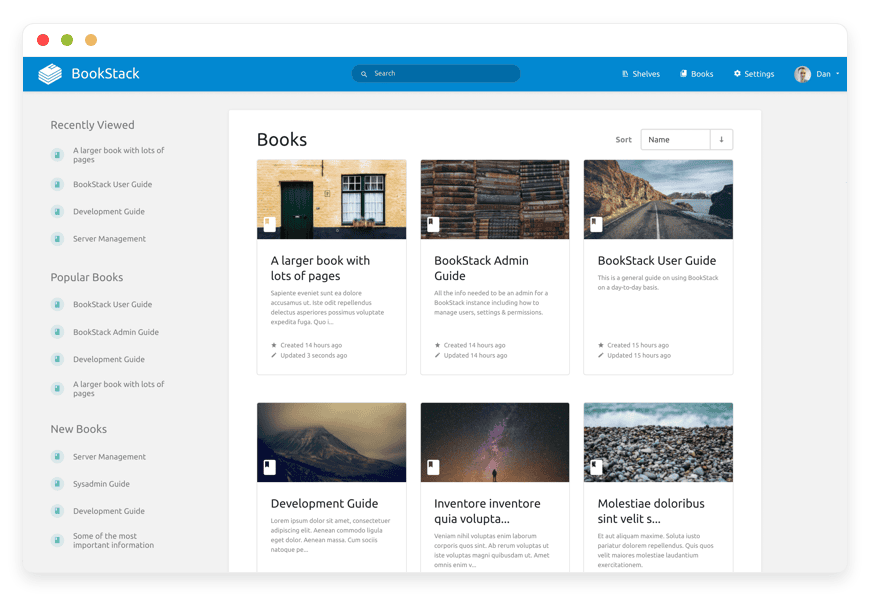
Managed BookStack Hosting: Your Knowledge, Organized and Accessible
TL;DR: Quick Answer
BookStack is an open-source platform designed strictly to store and organize information and documentation. It breaks the mold of traditional, complex wiki software by using a simple, relatable "Book" metaphor (Books, Chapters, Pages) that anyone can understand immediately.
Why choose Managed BookStack Hosting with DANIAN?
Instant Start: Skip the Linux command line, Composer dependencies, and database setup. Launch in minutes.
Intuitive Structure: No learning curve. It works like a physical library.
Visual Editors: Choose between a WYSIWYG editor or Markdown with live preview.
Enterprise Features: Integrated diagrams, role-based permissions, MFA, and Audit Logs included.
Zero Maintenance: We handle updates, security, and backups so you can focus on writing content.
Introduction
Documentation is the backbone of any successful project, yet it is often the most neglected part of the workflow. We have all been there: critical information scattered across chat logs, Google Docs, local text files, and email threads. When a new team member joins, or when a legacy system breaks at 2 AM, finding the right information becomes a panic-induced scavenger hunt.
BookStack solves this by making documentation pleasant to write and easy to find. It is clean, opinionated, and intentionally simple. It removes the friction that usually stops people from writing things down.
However, the reality of running BookStack yourself is less simple. It is a robust, modern PHP application built on the Laravel framework. To run it effectively, you need to manage a web server (Nginx/Apache), a database (MySQL/MariaDB), PHP dependencies via Composer, and cache drivers like Redis. You have to handle SSL certificates, configure mail servers for notifications, maintain PDF rendering engines (like wkhtmltopdf), and manually apply security patches. Suddenly, organizing your knowledge feels like a second job.
This is where DANIAN steps in as your invisible infrastructure team. We provide fully managed BookStack hosting that gives you all the power of this incredible software without the headache of maintaining a server. You get a secure, high-performance environment that just works.
What is BookStack?
BookStack is a free, open-source platform for creating documentation and wiki-style content. Created by Dan Brown, it was built to fill a gap in the market for a documentation tool that didn't look like it was built in the 1990s and didn't require a computer science degree to edit.
Unlike general-purpose wikis that leave structure entirely up to the user (often resulting in chaos), BookStack imposes a strict, logical hierarchy: Shelves > Books > Chapters > Pages. This structure mimics the physical world, making it immediately understandable to non-technical users.
Why is it trending?
BookStack has gained massive popularity because it respects the user's time. It removes the "blank canvas paralysis" found in other tools. The interface is modern and mobile-responsive out of the box. It integrates powerful features like draw.io (diagrams.net) directly into the editor, allowing teams to keep flowcharts and specs right alongside their text without needing third-party subscriptions.
Why Choose BookStack?
When looking at Hosting BookStack, you are choosing clarity. Many organizations suffer from "tool fatigue." They use tools that are too complex, leading employees to stop writing documentation altogether. Or, they use tools that are too simple (like a shared notepad), leading to disorganized data swamps.
BookStack changes this dynamic by being approachable. It balances the freedom of open-source with the polish of a high-end SaaS product. You get full control over your content format, robust search capabilities, and a permission system that is granular enough for corporate use but simple enough for small teams.
By choosing a managed environment, you ensure that this critical repository of knowledge is always online, fast, and secure, without diverting your engineering resources to maintain the hosting stack.
Key Features of BookStack
BookStack is packed with features designed to make writing and reading documentation effortless. It combines the utility of a wiki with the user experience of a modern blog platform. Here is a deep dive into what makes it stand out.
The Book Metaphor Hierarchy
Most wikis rely on a flat structure or confusing parent-child tag systems that become unmanageable as content grows. BookStack uses a strict hierarchy:
Shelves: High-level categorization (e.g., "IT Department," "HR Policies").
Books: Specific topics (e.g., "Server Maintenance," "Onboarding Guide").
Chapters: Sub-topics to group pages (optional but helpful for long books).
Pages: The actual content.
This structure ensures that every piece of content has a logical home. You never have to wonder where to save a document, and users naturally know where to look.
Dual Editing Interface
Different users prefer different workflows, and BookStack accommodates both seamlessly:
WYSIWYG Editor: A "What You See Is What You Get" interface based on TinyMCE. It works like a standard word processor, making it perfect for non-technical staff in HR or Marketing. It handles drag-and-drop image uploads effortlessly.
Markdown Editor: For developers who prefer writing in plain text with preview capabilities. The split-screen view shows your raw Markdown on the left and the rendered output on the right in real-time.
You can switch between these modes per page, ensuring everyone on the team is comfortable contributing.
Integrated Diagrams
Visuals are often better than text for explaining complex systems. BookStack integrates diagrams.net (formerly draw.io) directly into the editor. You can create flowcharts, network diagrams, and UML graphs without ever leaving the application. Because the integration is native, editing a diagram later is as simple as clicking it—no need to re-upload image files or search for the original source file.
Full-Text Search and Cross-Linking
As your documentation grows, finding content becomes the priority. BookStack features a robust server-side search mechanism that indexes your content. It supports advanced search operators, allowing you to filter by book, date, author, or tag.
Predictive Linking: When writing, you can link to other pages by highlighting text and searching for the target page in a popup. The system automatically inserts the correct link, maintaining the integrity of your internal references.
Granular Access Control & Roles
Security is built-in, not an afterthought. You can define roles (e.g., Admin, Editor, Viewer) and assign specific permissions.
Role-Based: Apply permissions globally to a role.
Asset-Based: Override permissions for specific Books, Chapters, or Pages.
Cascading Logic: Permissions set on a Book automatically cascade to Chapters and Pages unless manually overridden.
This is essential for keeping sensitive HR documents private while making technical manuals public to the whole company.
Audit Log and Accountability
For larger teams, knowing who changed what is critical. BookStack includes a comprehensive Audit Log.
Activity Tracking: Every creation, update, deletion, and move is logged.
User History: You can see exactly which user modified a page and at what time.
Revision History: BookStack saves revisions of pages automatically. If someone makes a mistake or deletes a crucial section, you can revert to a previous version with a single click.
Customization and Branding
Your documentation should feel like your documentation. BookStack allows for extensive visual customization without touching code.
Application Name & Colors: Match your company branding.
Logo: Upload your organization's logo to replace the default.
Custom HTML Head: Inject custom CSS or JavaScript if you need specific styling tweaks or analytics tracking.
Homepage Customization: Choose which Books or Shelves appear on the dashboard to guide users immediately to the most important content.
Developer-Friendly API
BookStack isn't just a UI; it is a platform. It offers a fully documented REST API. This allows developers to:
Automate Documentation: script the creation of pages based on code comments or build processes.
Export Content: Programmatically pull content for backups or migration.
User Management: Sync users from external scripts or systems.
Solutions per Industry
Software Development Agencies
The Problem: Agencies juggle multiple clients, each with unique server setups, API keys, and deployment procedures. This data is often lost in Slack or buried in README files that non-developers can't read.
The Solution: An agency can set up a "Shelf" for each client. Inside, "Books" can cover API Documentation, Deployment Protocols, and Meeting Notes. The code block support in the editor highlights syntax for over 10 languages, and the Markdown editor keeps developers happy.
Benefit: Reduced onboarding time for new developers and a professional, organized way to hand off documentation to clients.
Human Resources and Operations
The Problem: Employee handbooks are often static PDFs emailed once and never read again. Updating a policy means re-sending the file to the whole company, leading to version confusion.
The Solution: HR can maintain a live "Company Handbook" book. Chapters can be broken down into "Benefits," "Code of Conduct," and "Holiday Policies." When a policy changes, the page is updated instantly for everyone.
Benefit: A single source of truth for company policies. Permissions ensure that only HR staff can edit the policies, while all employees can view them.
Educational Institutions
The Problem: Teachers and professors need a way to distribute lesson plans, resources, and assignment details that is persistent and searchable, unlike a Learning Management System (LMS) which often resets every semester or locks content behind clunky interfaces.
The Solution: Educators can create Books for each course. Pages can contain embedded videos, diagrams of concepts, and downloadable attachments. The search function allows students to find specific concepts across the entire curriculum.
Benefit: A permanent, evolving knowledge base for students that grows richer every semester and can be easily exported to PDF for offline study.
Manufacturing and Engineering
The Problem: Manufacturing floors rely on strict Standard Operating Procedures (SOPs). Physical manuals get dirty or lost, and digital files on a shared drive are hard to search on a tablet.
The Solution: BookStack serves as the central repository for machine manuals and safety protocols. Complex machinery diagrams can be drawn directly in the app. The interface is responsive, meaning technicians can read SOPs on an iPad while standing in front of the machine.
Benefit: Increased safety and compliance. Updates to safety protocols are instant, ensuring no one is working off an old version of a manual.
Legal and Compliance Firms
The Problem: Law firms and compliance officers generate massive amounts of internal precedent and procedural documentation. This data must be secure, searchable, and audit-ready.
The Solution: Using BookStack’s strict permission system, a firm can isolate "Books" for specific practice areas (e.g., Corporate Law, Litigation). The Audit Log tracks exactly who viewed or edited a document, providing the accountability required in legal environments.
Benefit: A secure, searchable knowledge base that protects client confidentiality while allowing junior associates to quickly find precedents and internal filing procedures.
BookStack vs Other Softwares
It is important to understand where BookStack fits in the landscape of documentation tools. It is not a project management tool, nor is it a simple note-taking app.
| Feature | BookStack | Confluence (Proprietary) | DokuWiki (File-Based) |
| Cost | Open Source (Free Software) | Expensive / Per User | Open Source (Free) |
| Interface | Modern, Clean, Visual | Complex, Cluttered | Utilitarian |
| Structure | Strict (Book/Chapter/Page) | Free-form (Spaces/Trees) | Namespaces (Folders) |
| Editor | WYSIWYG & Markdown | WYSIWYG | WikiText (Syntax heavy) |
| Diagrams | Integrated (Free) | Requires Paid Add-ons | Plugin required |
| Hosting | Self or Managed (DANIAN) | SaaS Only (mostly) | Self or Managed (DANIAN) |
| Speed | Very Fast (Database driven) | Can be sluggish | Fast (Flat file) |
Summary: BookStack offers the visual polish of Confluence without the exorbitant cost or feature bloat, and the speed of DokuWiki without the utilitarian interface.
Use Cases and Applications
BookStack is versatile. Here are some of the most effective ways our users organize their work:
Standard Operating Procedures (SOPs): Document every repeatable process in your business. From "How to close the register" to "How to deploy to production."
Call Center Knowledge Base: Give support agents a searchable database of scripts and troubleshooting steps to resolve customer issues faster.
Personal Knowledge Management: Individuals use it to organize recipes, study notes, home renovation plans, and hobby research.
Technical Specification Repository: Store database schemas, API endpoints, and architecture diagrams in one central location.
Inventory Logging: While not a dedicated asset manager, the ability to create structured pages with tables makes it excellent for tracking office equipment or IT assets.
Collaborative Story Writing: Writers use the Book/Chapter structure to outline novels, store character bios, and draft scenes in an organized format.
How DANIAN Helps
We act as the "Quiet Enabler." We handle the mess of infrastructure so you get the glory of a perfectly organized team. While BookStack is free software, the time required to keep it running securely is not.
Here is what our Managed BookStack Hosting includes:
Fully Managed: We handle the hosting. Our team manages everything from the initial launch to regular system updates. You get the latest features of BookStack without ever touching a command line.
Backup & Monitoring: Your knowledge is precious. We configure automated daily backups and store them securely off-site. If you delete a critical Book by accident, we can help you restore it.
SSL & Firewall: Secure by default. With cybersecurity threats on the rise, we take security seriously. From automated SSL certificate renewals to proactive server monitoring and custom firewalls, we make sure your environment is secure 24/7.
Updates: BookStack releases updates frequently with new features and security patches. We apply these for you, ensuring compatibility and uptime.
Guaranteed Performance: Downtime allows knowledge to vanish. With our scalable infrastructure, we ensure consistent performance and fast page loads, even as your library grows to thousands of pages.
7-Day Free Trial: We believe in our quality of service. You can spin up a fully functional instance and test it with your team at no risk.
The Bottom Line: Less setup, more writing. Affordable from the start. Real help when you need it.
How to Get Started
Launching your own BookStack instance takes less time than reading this section.
Visit DANIAN: Go to our signup page.
Select BookStack: Choose it from our catalog of open-source applications.
Launch: Sit back. In a few minutes, you will receive your credentials.
FAQ
1. Is BookStack free?
The software itself is open-source and free (MIT License). However, running it requires server resources, storage, and maintenance. DANIAN provides the hosting and management service for a flat monthly fee.
2. How does the "Book" hierarchy work?
It is strict but simple. You create a Book (e.g., "Marketing"). Inside, you can create Chapters (e.g., "Social Media") or just add Pages directly. You cannot put a Book inside a Book. This constraint prevents the structure from becoming messy and unmanageable.
3. Can I make my BookStack public?
Yes. You can toggle the "Public" viewing option in the settings, allowing anyone on the internet to view your documentation without logging in, while keeping editing restricted to your team.
4. Does it support Multi-Factor Authentication (MFA)?
Yes, BookStack supports MFA natively. Users can configure TOTP (Time-based One-Time Password) using apps like Google Authenticator or Authy to add an extra layer of security to their accounts.
5. Can I customize the look and feel?
Yes. You can change the application name, upload your own logo, and adjust the primary colors to match your brand identity directly from the settings menu.
Conclusion
BookStack is a breath of fresh air in the world of documentation. It proves that organization doesn't have to be complicated to be effective. It strikes the perfect balance between power and usability, making it the ideal choice for teams who want to get information out of their heads and into a shared, searchable format.
Don't let server maintenance stop you from organizing your knowledge. Let DANIAN handle the technical heavy lifting so you can focus on building your library.


