
Managed 2FAuth Hosting: The Ultimate Guide to Secure 2FA
TLDR - Quick Answer
2FAuth is a web-based, self-hosted alternative to mobile apps like Google Authenticator or Authy.
It generates your security codes across all your devices, removing the strict reliance on your smartphone.
Managed 2FAuth Hosting gives you a ready-to-use authenticator environment without server setup, database configuration, or maintenance.
Your security tokens stay private, encrypted, and backed up automatically.
Skip the terminal and get immediate access with a fully managed setup.
Introduction
We all know the frustration of needing a two-factor authentication code, only to realize our phone is in the other room. Or worse, losing a smartphone and instantly losing access to dozens of critical accounts because the authenticator app did not sync. Two-factor authentication is critical for security today. However, managing those codes has become a massive headache for professionals and teams.
2FAuth solves this exact problem by putting your security codes in a secure, web-based app you can access from any browser. You gain complete flexibility over how and where you log in. You no longer have to pass a single physical device around an office just to check a dashboard.
But running it yourself is a second job. Setting up the server environment, configuring the database, securing the installation with encryption keys, and keeping the software updated takes precious time away from your actual work. If the server goes down, you lose access to all your logins. You cannot afford downtime on an application that holds the keys to your digital life.
That is where DANIAN steps in as your invisible infrastructure. We handle the heavy lifting of server management, security updates, and daily backups. You get a reliable, private authenticator app that simply works.
What is 2FAuth?
2FAuth is an open-source web application designed to manage your Two-Factor Authentication (2FA) accounts. Created by the open-source developer known as Bubka, it serves as a robust alternative to standard One Time Passcode (OTP) generators.
Instead of locking your security tokens to a single mobile device, 2FAuth stores them securely in a standalone database. This database is then accessible via a clean, responsive web interface. You can log in from your desktop, laptop, or phone to generate the codes you need instantly. It bridges the gap between strict security requirements and daily operational convenience.
Why is it trending?
With two-factor authentication becoming mandatory for most online services, users are experiencing serious authenticator fatigue. Relying solely on a single smartphone is risky and highly inconvenient for anyone working primarily on a computer. 2FAuth is trending because it untethers your security codes from a specific piece of hardware. It allows you to organize your codes into customizable groups, access them from any browser, and back them up securely. It simplifies the security process for individuals and teams alike, turning a daily annoyance into a smooth workflow.
Why Choose 2FAuth?
Choosing 2FAuth is about taking control of your digital security. Proprietary applications often trap your security tokens inside their closed ecosystems. If you lose your device or the company changes its terms of service, you risk losing access to your critical accounts.
With an open-source solution, you gain complete freedom. The code is transparent, heavily scrutinized by the community, and free from hidden trackers. When you opt for Hosting 2FAuth, you get the exact same convenience as major commercial apps, but with enhanced privacy. You decide exactly who has access to the server, and you can export your codes at any time. It replaces proprietary authenticators completely while adding powerful features like multi-user support, custom hardware key authentication, and desktop browser extensions.
Key Features of 2FAuth
2FAuth is packed with functionalities designed to streamline how you handle security codes. Here is a deep dive into what makes it exceptional and how it improves your daily workflow.
Cross-Device Availability
You do not need your phone to log in to your accounts. Because 2FAuth is a responsive web application, you can access your TOTP (Time-based One-Time Password) and HOTP (HMAC-based One-Time Password) codes from any device with an internet connection. This eliminates the frantic search for your mobile device when you are already sitting at your computer working.Advanced QR Code Scanning
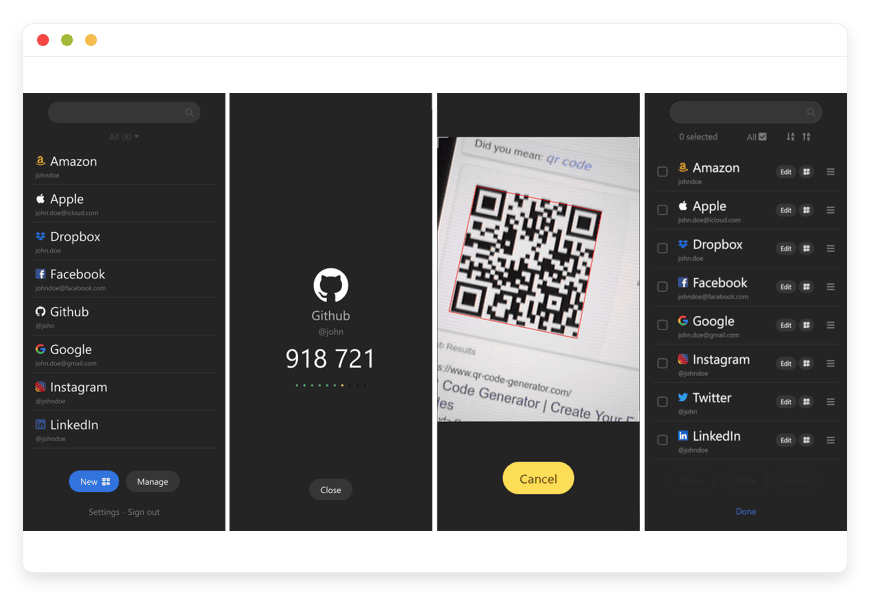
Adding a new account is incredibly fast. You can use your device camera to scan a QR code, or simply upload an image of the QR code directly into the web interface. The app decodes the image and configures the account instantly. It even decodes non-2FA QR codes for added utility. You can also add accounts manually using an advanced form if you do not have a QR code.Organization and Grouping
If you manage dozens of accounts, finding the right code can be tedious. 2FAuth allows you to organize your credentials into customizable Groups. You can separate personal accounts, work logins, and client portals, keeping your dashboard clean and easy to navigate.Extensive Icon Library
Visual organization speeds up your workflow. 2FAuth allows you to assign custom icons to your individual 2FA accounts. You can easily spot the logo for your email provider, social media account, or banking portal at a glance instead of reading through text lists.Robust Data Protection and Encryption
Security is paramount for an authenticator. 2FAuth offers database encryption to protect your sensitive tokens against compromise. It generates OTP codes strictly according to RFC 4226 and RFC 6238 standards. Additionally, it features an auto-lock mechanism that logs you out after a defined period of inactivity.Modern Authentication with WebAuthn
You can secure your 2FAuth login using modern authentication methods. It supports WebAuthn, meaning you can require hardware security keys like a YubiKey or a Titan key to access your codes. This creates an incredibly strong defense around your most sensitive data.Single Sign-On (SSO) Support
For larger teams, managing individual passwords for every tool is inefficient. 2FAuth supports OpenID Connect (OIDC). This means you can integrate it with your existing identity provider. Users can log into the authenticator using their standard company credentials.Authentication Proxies
If you run your applications behind a secure gateway, 2FAuth integrates beautifully. It supports authentication proxies like Authelia and Forward Auth. This allows you to protect the application at the network level before a user ever sees the login screen.Personal Access Tokens (PAT)
Developers need secure ways to interact with applications programmatically. 2FAuth allows you to generate Personal Access Tokens. You can use these tokens to authenticate API requests without exposing your primary username and password.Multi-User Capabilities
Unlike most mobile authenticators built for a single user, 2FAuth supports multiple accounts on one setup. You can share your environment with family members or team members. Everyone gets their own private, secure vault for their specific codes, managed by a central administrator.Seamless Migrations
Switching to 2FAuth is straightforward. It supports importing your existing codes from popular formats. You can import from Google Authenticator via QR code, Aegis Authenticator via JSON or plain text, Raivo, Bitwarden, and 2FAS Auth. You do not have to manually reconfigure every single account.Browser Extensions and API
For absolute convenience, 2FAuth offers official browser extensions for Chrome and Firefox. You can generate and paste OTPs directly from your browser toolbar. It also features a comprehensive REST API documented with RapiDoc and OpenAPI, allowing developers to integrate code generation into custom internal tools easily.Steam Guard Support
Gamers and developers working with Steam will appreciate that 2FAuth natively supports generating Steam Guard codes. This is a rare feature often missing from standard authenticator apps.
Solutions per Industry
IT Support and Managed Service Providers
IT agencies manage hundreds of client accounts, from domain registrars to server control panels. Relying on a single shared smartphone for two-factor codes creates massive bottlenecks and security risks. Technicians waste time tracking down the office phone just to restart a client server. By utilizing a central authenticator app, the agency provides each technician with a secure, web-based portal. Technicians access the specific codes they need to do their jobs, categorized neatly by client groups, without passing a phone around the office.
Finance and Accounting Teams
Accounting firms handle sensitive banking portals, payroll systems, and tax software that strictly require two-factor authentication. Waiting for the head accountant to forward a text message or read a code from their phone slows down operations during tax season. A managed authenticator environment allows the team to securely log into financial platforms from their respective workstations. They maintain strict access controls and encrypted data storage while working highly efficiently.
E-commerce and Retail Brands
Running an online store involves multiple team members accessing payment gateways, order fulfillment systems, and customer service platforms. These platforms mandate strict security. If the store owner holds the only device with the 2FA codes, the team cannot process refunds or update shipping statuses independently. With 2FAuth, the marketing team accesses the social media code while the fulfillment team accesses the shipping portal code simultaneously. No one is blocked waiting for an approval prompt, ensuring smooth daily operations.
Digital Marketing Agencies
Marketing agencies manage dozens of social media accounts, advertising platforms, and analytics dashboards for their clients. Sharing passwords is bad enough, but sharing 2FA codes is a logistical nightmare. Often, account managers are forced to text each other asking for the latest six-digit code before it expires. 2FAuth eliminates this chaos. The agency can create a specific group for each client. When an account manager needs to log into a client dashboard, they simply open a new tab, grab the code, and log in.
Educational Institutions
Universities and schools rely heavily on secure portals for grading, student records, and internal communication. Professors, administrators, and IT staff all need access to different systems protected by mandatory two-factor authentication. Distributing hardware tokens to hundreds of staff members is expensive and inefficient. 2FAuth provides a centralized, web-accessible solution. IT administrators can assign specific user roles, ensuring professors only see the codes relevant to their grading portals, while administrative staff access billing and enrollment codes securely.
Healthcare Clinics
Medical clinics use specialized scheduling software, billing platforms, and patient communication tools. The front desk staff must log into these systems quickly to check in patients and process payments. If the office manager has the only smartphone with the authenticator app, the entire check-in process grinds to a halt when that manager steps away. Using a managed 2FAuth setup, the clinic ensures every authorized terminal has instant, secure access to the necessary login codes. Workflow remains uninterrupted, and patient intake moves swiftly.
Software Development Teams
Development teams constantly access code repositories, cloud provider dashboards, and CI/CD pipelines. These tools form the backbone of their infrastructure and require rigid security. Developers lose momentum when they have to switch context, find their phone, unlock it, and type out a code manually. By integrating 2FAuth into their workflow, developers can use browser extensions to auto-fill codes or use the REST API to automate secure logins for testing environments. It keeps the development cycle moving fast without compromising security.
Legal Firms
Law firms handle highly sensitive client information, case management software, and electronic discovery platforms. Attorneys and paralegals often collaborate on the same cases and need access to shared secure portals. Using individual mobile authenticators makes collaboration difficult. 2FAuth allows the firm to store secure tokens centrally. A paralegal can access the necessary portal to upload court documents while the attorney is in court, completely independent of the attorney's physical device.
2FAuth vs Other Softwares
How does 2FAuth stack up against proprietary authenticator apps? Here is a clear comparison of the features.
| Feature | 2FAuth | Google Authenticator | Authy |
Delivery Model | Web App (Desktop & Mobile) | Mobile App Only | Mobile & Desktop App |
Code Organization | Custom Groups & Folders | Basic Single List | Basic Grid/List |
Open-Source Freedom | Yes | No | No |
Multi-User Support | Yes | No | No |
Web Browser Extension | Yes (Official Chrome/Firefox) | No | No |
Hardware Key Support | Yes (WebAuthn / YubiKey) | No | No |
Import / Export | Comprehensive (JSON, QR, Plain Text) | Highly Restricted | Restricted |
Steam Guard Codes | Yes | No | No |
Custom Icons | Yes | Limited | Limited |
REST API Access | Yes | No | No |
Use Cases and Applications
2FAuth fits perfectly into numerous daily workflows. Here are practical examples for professionals and individuals.
Remote Team Collaboration: Remote workers can access shared company accounts securely from their home offices. They do not need a physical device shipped to them, and they avoid relying on insecure SMS forwarding setups.
Personal Security Vaults: Individuals can back up their entire digital life securely. If a phone breaks or is stolen, the web-based vault remains perfectly accessible from any other computer.
Developer API Integration: Software developers use the REST API to automate login flows for testing environments that require security codes, drastically speeding up QA processes.
Gaming Account Security: Streamers and gamers manage their Steam Guard, Discord, and Twitch codes from a single desktop interface. They do not have to interrupt their broadcast to check a phone screen.
Family Password Management: A household uses the multi-user feature so spouses and children have secure, independent access to family accounts like streaming services, banking, or utilities.
How DANIAN Helps
We are the quiet enabler behind your software. We handle the mess of infrastructure so you get the glory of a perfect, reliable authenticator app. Running a security app requires constant vigilance, but with DANIAN, you do not have to worry about the technical details.
Fully Managed: We handle the hosting. Our team manages everything from initial setup to regular updates, security patches, and performance monitoring. Your software is always optimized without you having to lift a finger.
Backup & Monitoring: Automated daily backups, stored securely. Configured automatically, stored securely, one-click restore.
SSL & Firewall: Secure by default. With cybersecurity threats on the rise, we take security seriously. From automated updates to proactive monitoring and custom firewalls, we make sure your environment is secure 24/7.
Updates: Security patches and new versions applied without your intervention. You always have the latest features and bug fixes.
24/7 monitoring: Issues detected and often resolved before you notice.
Guaranteed Performance: Downtime can be detrimental to your business. With our scalable infrastructure, we ensure consistent performance even as your user base grows.
7-Day Free Trial: No risk.
Less Setup, More Development. Affordable from the Start. Real Help When You Need It.
How to Get Started
Getting your authenticator up and running takes just a few minutes. You do not need to read complex documentation or configure databases.
Step 1: Visit danian.co and sign up for a new account.
Step 2: Select 2FAuth from the software catalog.
Step 3: Relax while DANIAN launches your software and configures the security settings automatically.
FAQ
Is 2FAuth free to use?
The 2FAuth software itself is open-source and free to use under the AGPL-3.0 license. When you choose Managed 2FAuth Hosting, you are paying for the server resources, maintenance, and automated backups, not the software license.
Can I use 2FAuth without my phone?
Absolutely. That is the main advantage of 2FAuth. It is a web application, meaning you can access your security codes from a desktop browser, a laptop, or a tablet easily.
How secure is my data in 2FAuth?
Very secure. 2FAuth supports database encryption to protect your tokens. You can also enforce WebAuthn for logging into your account, adding a hardware-level security layer.
Can I import my codes from other authenticator apps?
Yes. 2FAuth provides an import tool that works with export formats from Google Authenticator, Aegis, Raivo, Bitwarden, and 2FAS. This makes the transition seamless and fast.
Does 2FAuth support multiple users?
Yes. You can create multiple user accounts within a single setup. Each user gets their own private workspace for their tokens, making it perfect for teams or families.
What happens if I accidentally delete an account?
If you use our managed hosting, your database is backed up daily. You can easily restore your data from an automated backup to recover deleted tokens without stress.
Does it offer an API for developers?
Yes. 2FAuth provides a complete REST API with full documentation. You can perform most of its functionalities from external applications, making it highly extensible for custom tools.
Can I protect the login screen with Single Sign-On?
Yes. 2FAuth supports OpenID Connect (OIDC), allowing you to integrate it with your existing identity provider for streamlined team access.
Conclusion
2FAuth transforms how you manage your digital security. By moving your two-factor authentication codes to a secure, web-based platform, you eliminate device dependency, improve organization, and speed up your daily logins. It is a powerful open-source tool that directly solves the modern problem of authenticator fatigue.
However, hosting a critical security application yourself requires constant maintenance and flawless server administration. Let DANIAN handle the technical complexities so you can focus on your work.
Experience the power of fully managed open-source.


