
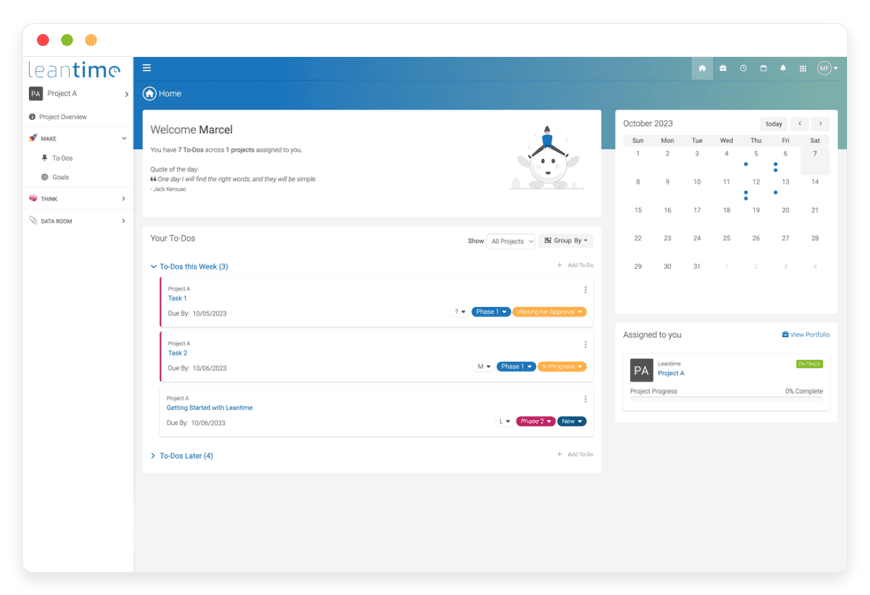
Managed Leantime Hosting: Strategy Meets Execution
TLDR: Quick Answer
If you need project management software that connects high-level strategy to daily tasks, Leantime is the answer. If you want to use it without managing a Linux server, Managed Leantime Hosting by DANIAN is the solution.
Here is the immediate value you get:
Cognitive Accessibility: An interface designed specifically for ADHD and neurodiverse minds to maintain focus and reduce anxiety.
Strategy First: Built-in Lean Canvas, SWOT analysis, and goal tracking that connect directly to your tasks.
All-in-One Utility: Time tracking, retrospectives, whiteboards, and idea management are native, not expensive plugins.
Zero Maintenance: We handle the updates, security patches, and database backups.
Instant Start: You get a running system in minutes, skipping the command line entirely.
Introduction
Most project management tools force you into a box. You either get a simple list of cards that lacks depth, or you get a complex enterprise behemoth that feels like filling out tax forms. The former fails when your project scales; the latter fails because your team hates using it.
Leantime changes this dynamic. It bridges the gap between "what are we doing?" and "why are we doing it?" It is an incredible piece of software for teams that care about the bigger picture but struggle with the granular execution. It is particularly powerful because it acknowledges that the people doing the work are humans, not robots.
But here is the reality check: running it yourself is a second job. To self-host Leantime effectively, you have to configure a LAMP (Linux, Apache, MySQL, PHP) stack. You have to manage PHP extensions, handle database migrations, set up cron jobs for email notifications, and worry about SSL certificates renewing on time. If your server goes down while you are sleeping, your team cannot work.
That is where DANIAN comes in. We provide the invisible infrastructure. You get the full power of the software without touching a terminal. We keep your system fast, secure, and online so you can focus on shipping products.
What is Leantime?
Leantime is an open-source project management system built for product teams, but with a significant twist. It was created by Gloria and Marcel Frupillo with a specific mission: to make work management accessible for diverse minds.
Unlike standard tools that treat humans like resources processing tickets, Leantime uses psychology-based design principles. It integrates dopamine-friendly features and minimizes cognitive load. It combines strategy planning, idea management, and task execution into a single cohesive platform.
Technically, it is a robust application written in PHP with a MySQL database backend. It is designed to be lightweight yet powerful enough to replace tools like Jira, Trello, and Asana combined.
Why is it trending?
The tech world is tired of context switching. Developers and product managers are exhausted from jumping between a strategy doc in one app, a roadmap in another, and tasks in a third. This fragmentation kills productivity.
Leantime is trending because it consolidates these workflows. It allows you to see the "Why" (Strategy) right next to the "How" (Kanban/Gantt). Furthermore, the rise in awareness regarding neurodiversity in tech—specifically ADHD and Autism—has driven teams to look for tools that support non-linear thinking. Leantime is the leader in this space.
Why Choose Leantime?
When looking at Hosting Leantime, you are looking for a system that respects your time and your brain. Proprietary SaaS tools often hide their best features behind expensive "Enterprise" tiers. Leantime gives you everything out of the box.
The primary reason teams choose this platform is its focus on "inclusive work management." If you or your team members struggle with executive dysfunction or ADHD, standard lists can be overwhelming. Leantime breaks projects down visually. It encourages small wins. It tracks progress in a way that feels rewarding rather than punitive.
Furthermore, it is designed for product innovation. You aren't just closing tickets; you are validating ideas. You can track an idea from the initial "Research" phase all the way to "Done" without losing the strategic context. This makes it the ideal tool for startups and R&D departments where the path forward isn't always clear.
Key Features of Leantime
Leantime is dense with features, but they are organized intuitively. Unlike other platforms that rely on third-party plugins to add functionality, Leantime includes the essentials in the core. Here is a deep dive into what makes this platform unique and how it changes your workflow.
Strategic Planning Boards (The "Why")
Most tools assume you already have a plan. Leantime helps you build one. This is the standout feature that separates it from basic task trackers.
Lean Canvas: You can fill out a digital Lean Canvas directly in the project. This forces you to define the Problem, Solution, Unique Value Proposition, and Customer Segments before writing a single line of code.
SWOT Analysis: A dedicated view for Strengths, Weaknesses, Opportunities, and Threats. This is vital for product managers to assess market positioning.
Empathy Maps: Understanding your user is key. Leantime provides boards to map out what your user Says, Thinks, Does, and Feels.
Goal Tracking: You can set high-level goals and attach metrics to them. Every task in the system can be linked back to a goal, ensuring that no work is done in isolation.
Idea Management and Validation
Before a task becomes a task, it is an idea. In most systems, ideas get lost in Slack threads or email chains. Leantime provides a structured Idea Board.
The Funnel: You can move ideas through stages: New -> Research -> Validated -> Backlog.
Voting and Discussion: Team members can upvote ideas and discuss them before they clutter the roadmap.
Conversion: Once an idea is validated, you can convert it into a Milestone or a Project with a single click. This keeps your backlog clean. Only validated work enters the production pipeline.
Variable Task Views
People process information differently. Some need a list; others need a visual board. Leantime respects this by offering multiple views for the exact same data without requiring configuration.
Kanban Boards: Standard drag-and-drop boards. However, Leantime’s Kanban is "status-based," meaning columns are tied to the lifecycle of the ticket. It supports swimlanes to group tasks by assignee or priority.
List View: A dense, line-item view for those who prefer a linear approach to triage large backlogs.
Table View: Similar to a spreadsheet. This is excellent for bulk editing properties like due dates or assignees.
Gantt Charts: For visualizing dependencies and timelines. The Gantt view is interactive; dragging the bar updates the due dates on the task automatically.
Calendar: A straightforward view of deadlines.
Built-in Retrospectives
Agile teams usually need a separate tool (like Miro or dedicated retro apps) to run retrospectives. Leantime has this built-in.
Templates: You can launch a retrospective board with standard templates like "Start, Stop, Continue," "Mad, Sad, Glad," or the "Sailboat" method.
Anonymity: Team members can add cards anonymously, which encourages honest feedback about what went wrong during a sprint.
Action Items: You can convert retro cards directly into tasks for the next sprint, closing the loop on continuous improvement.
Time Tracking and Timesheets
You do not need a third-party timer. Leantime allows users to clock in and out of tasks directly from the task card.
embedded Timer: A simple play/pause button on every task.
Manual Entry: Users can log hours manually if they forgot to start the timer.
Timesheet Generation: Admins can generate reports to see exactly how many hours were spent on a specific project or by a specific user. This is vital for agencies that need to bill clients or for product teams trying to estimate velocity accurately.
The "Project Blueprint" Dashboard
The Project Blueprint is the home screen for any given project. It aggregates all the critical information into one "at a glance" view.
Status Bars: Visual progress bars showing completion rates of milestones.
Recent Activity: A feed of who did what recently.
Upcoming Deadlines: A clear list of what is due soon.
Cognitive Load Reduction: This dashboard is designed to orient the user immediately. You don't have to hunt for information; the state of the project is obvious the moment you log in.
"Leah" AI Integration
Leantime includes an AI helper named "Leah." While the depth of this feature depends on your configuration and API keys (which you can manage in your secure DANIAN environment), the system is built to leverage AI for:
Status Updates: summarizing what has happened in a task.
Task Breakdown: Taking a complex title and suggesting subtasks.
Sentiment Analysis: analyzing the tone of comments to gauge team morale.
Risk Detection: Highlighting tasks that are likely to miss their deadline based on current progress.
Reports and Analytics
Data-driven teams need numbers. Leantime provides charts that are actually useful, not just decorative.
Burndown Charts: Essential for Scrum teams to track sprint velocity.
Velocity Charts: See how much work your team completes on average to plan future sprints better.
Time Reports: Breakdown of time spent per project or user.
Solutions per Industry
Leantime is versatile. While it was born for product teams, its feature set solves problems across a wide spectrum of industries. Here is how specific sectors are utilizing Managed Leantime Hosting.
Digital Agencies & Dev Shops
Agencies often struggle with client transparency and "scope creep." You have the work, but the client wants to know where their budget is going, and your developers are tired of the client emailing them directly.
The Workflow: Agencies use Leantime to manage multiple client projects in one install. They use the Time Tracking feature to log billable hours against specific tasks.
The Solution: Leantime’s role-based permissions allow you to invite clients as "Viewers" or "Commenters." Clients can log in and see the Gantt Chart or Roadmap to check progress, but they cannot drag cards around or delete tasks. This provides transparency without risking the integrity of your workflow. The built-in timesheets mean you can generate a billing report in seconds, not hours.
Hardware Startups & Manufacturing
Hardware development is different from software. It involves physical goods, shipping times, and rigid dependencies (Waterfall) mixed with iterative R&D (Agile).
The Workflow: A hardware team uses the Idea Board to manage R&D concepts for a new device enclosure. Once a concept is chosen, they move to the Gantt Chart.
The Solution: You cannot "agile" your way through a manufacturing mold delay. Leantime’s Gantt chart visualizes these hard dependencies. If a part from a supplier is delayed, you drag that bar, and Leantime shows you exactly which downstream tasks (like assembly or testing) are impacted. This hybrid approach—Agile for design, Waterfall for production—is rare in other tools but native to Leantime.
Education and Research Grants
Academic projects and research grants have strict goals, defined budgets, and often messy, non-linear execution phases.
The Workflow: A research team uses the Research Board (a variation of the Idea board) to document hypotheses. They attach their grant requirements to the Goal Tracking feature.
The Solution: For neurodiverse students or researchers, the dopamine-centric design helps maintain motivation over long, grueling projects. The ability to attach files and whiteboards to specific tasks allows researchers to keep their data and their to-do list in the same context. When it is time to report to the grant authority, the Project Blueprint provides an instant snapshot of progress against the initial proposal.
Non-Profit Organizations (NGOs)
Non-profits are mission-driven. They need to ensure that every dollar and hour spent aligns with their core mission, but they often rely on volunteers who are not tech-savvy.
The Workflow: An NGO uses the Lean Canvas to map out their social impact model rather than a business model. They use the Kanban Board to organize volunteer tasks for an upcoming fundraising event.
The Solution: Leantime is intuitive. Volunteers do not need a certification to understand how to move a card from "To Do" to "Done." The Strategy Board keeps the mission visible at all times. If a task doesn't serve the mission, it is easy to see that disconnect in Leantime. Furthermore, using open-source software aligns with the ethical stance of many NGOs regarding data sovereignty and community collaboration.
Game Development Studios
Game dev is a chaotic blend of creative art, rigid code, and sound design. It requires tracking assets (images, audio) alongside bugs and features.
The Workflow: A studio uses the List View for the programming team (bug tracking) and the Gallery/Kanban View for the art team (asset pipeline).
The Solution: The Milestone feature is critical here. Game devs work in versions (Alpha, Beta, Gold Master). Leantime allows the team to group tasks by these milestones. The Retrospective board is used after every "build" release to discuss what broke and how to fix the pipeline for the next build. The visual nature of Leantime appeals to artists who might find text-heavy tools like Jira repulsive.
Remote-First Companies
Remote teams suffer from isolation and lack of visibility. You cannot see your colleague working, so you don't know if they are blocked.
The Workflow: A fully remote team relies heavily on the Project Dashboard and Status Updates.
The Solution: Leantime’s Whiteboard feature allows for asynchronous brainstorming. A team member in Europe can sketch a diagram on the whiteboard, and their colleague in the US can pick it up six hours later. The Empathy Maps are also used internally to understand employee wellbeing, not just customer sentiment, fostering a better remote culture.
Freelancers and Solopreneurs
When you are a team of one, you wear every hat: CEO, worker, marketer, and accountant.
The Workflow: A freelancer uses the Calendar View to ensure they don't overbook themselves. They use the Pomodoro technique (via the timer) to stay focused.
The Solution: The biggest struggle for solopreneurs is "Shiny Object Syndrome"—starting new projects before finishing old ones. Leantime’s Idea Funnel forces the freelancer to validate a new business idea before creating tasks for it. This discipline saves weeks of wasted effort. Plus, the built-in time tracking means they can bill clients accurately without paying for a separate Harvest or Toggl subscription.
Leantime vs Other Software
How does Leantime Managed hosting stack up against other popular software options?
| Feature | Leantime | Jira (Software) | Trello (Software) | Asana (Software) |
| Primary Focus | Strategy + Execution | Issue Tracking | Simple Lists | Task Management |
| Cognitive Design | ADHD/Dyslexia Friendly | High Complexity | Low Complexity | Medium Complexity |
| Strategy Boards | Built-in (Lean Canvas) | Plugin Required | Power-Up Required | Enterprise Tier Only |
| Retrospectives | Native | Plugin Required | Power-Up Required | Templates Only |
| Time Tracking | Native | Plugin Required | Power-Up Required | Integration Required |
| Whiteboards | Native | Separate App (Confluence) | Limited | Separate View |
| Open Source | Yes | No | No | No |
The Strategic Gap:
Most tools are "Task Managers." They are great at helping you check off boxes. Leantime is a "Work Management System." The difference lies in the connection between the Task and the Goal. In Trello, a card is just a card. In Leantime, a card is a step toward a Milestone, which is part of a Strategy, which is defined in your Business Case. This hierarchy is invisible in other tools but fundamental to Leantime.
Use Cases and Applications
We see users maximizing Hosting Leantime for a variety of scenarios beyond standard coding projects.
Marketing Campaign Management: Marketing teams use the Kanban board to move content from "Draft" to "Review" to "Published," while using the Strategy board to define user personas. The calendar view helps coordinate social media blasts.
Personal Life Management: Individuals with ADHD use Leantime to organize personal moves, renovations, or life goals. The visual cues and dopamine-rewarding progress bars help them stick to personal projects that usually get abandoned.
Consulting Engagements: Consultants use the retrospective tools to run workshops with clients. They project the Leantime board on a screen, document the client's feedback in real-time, and convert that feedback into a project plan instantly.
Event Planning: The Gantt chart is perfect for visualizing the critical path of an event. You can see that "Booking Caterer" must happen before "Finalizing Menu." This visual dependency prevents last-minute disasters.
Writing and Publishing: Authors use the board to outline chapters (Milestones) and scenes (Tasks). The research board holds character bios and plot ideas, keeping the "world bible" in the same app as the writing schedule.
How DANIAN Helps
We act as the "quiet enabler" of your workflow. You want the software; you do not want the sysadmin chores. We handle the mess; you get the glory.
Fully Managed Infrastructure
We handle the hosting. Our team manages everything from the initial server provisioning to regular OS updates, security patches, and performance monitoring. Your software is always optimized without you having to lift a finger. You do not need to know what SSH is or how to configure an Apache virtual host.
Automated Backup & Recovery
Data loss is not an option. We configure automated daily backups and store them securely in an off-site location. If you delete a critical project by accident, or if a team member makes a catastrophic change, we offer a one-click restore. We act as your safety net.
Security First
With cybersecurity threats on the rise, we take security seriously. Leantime is secure, but the server it runs on needs protection too. We provide:
SSL Certificates: Secure HTTPS connections by default.
Firewalls: Custom firewall rules to block malicious traffic.
Monitoring: 24/7 proactive monitoring. Issues are often detected and resolved by our automated systems before you even notice them.
Seamless Updates
Leantime is an active open-source project. New features and bug fixes are released frequently. Updating a self-hosted instance can be risky—databases can break, and dependencies can conflict. We handle these updates for you. We test patches and apply them so you always have the latest features without the risk of downtime.
Guaranteed Performance
Downtime can be detrimental to your business. A slow interface kills your team's momentum. With our scalable infrastructure, we ensure consistent performance. Whether you have 5 users or 500, our servers are tuned specifically for PHP applications like Leantime to ensure snappy load times.
7-Day Free Trial
There is no risk to try it out. We believe the product speaks for itself. You can spin up a fully managed instance, import your data, and test it with your team for a week completely free.
We believe in "Less Setup, More Development." You get affordable hosting from the start and real help when you need it.
How to Get Started
Getting your project management system running takes three simple steps:
Visit DANIAN: Go to our signup page.
Select Leantime: Choose it from our catalog of supported applications.
Launch: Sit back. We spin up the environment, configure the database, install the necessary PHP extensions, and secure the connection.
You will receive a link to your fresh Leantime installation. You can log in, invite your team, and start building your strategy immediately.
FAQ
1. Is Leantime really free?
The software source code is open-source (AGPL). You can download it and run it yourself if you have the hardware and skills. However, running it requires server resources (CPU, RAM, Storage) and maintenance time. At DANIAN, you pay for the Managed Leantime Hosting service. We rent the servers and provide the engineering time to keep them running, secure, and backed up.
2. Can I use my own domain name?
Yes. By default, you get a DANIAN subdomain, but you can easily connect a custom domain (e.g., projects.yourcompany.com) to your service through our dashboard. We handle the SSL certificate generation for your custom domain automatically.
3. How do upgrades work?
We handle them. When a stable release is available, our system updates your software. We ensure compatibility so you don't experience downtime or database corruption during the process.
4. Can I export my data later?
Yes. You retain full control of your data. You can export your database and files from Leantime at any time. We do not hold your data hostage. If you decide to leave, you take your work with you.
5. Does this include email notifications?
Yes. One of the hardest parts of self-hosting is configuring SMTP for emails (password resets, task assignments). We configure this out of the box so your instance can send email notifications immediately.
6. Is this suitable for large teams?
Absolutely. Leantime scales well, and our infrastructure is designed to handle increased traffic and database load. As your team grows, we can allocate more resources to your service to ensure it remains fast.
7. How does Leantime help with ADHD?
It uses specific design choices like high-contrast visuals, "gamified" progress bars, and simplified views that reduce working memory strain. It allows users to break large, scary tasks into tiny, manageable subtasks, which helps overcome executive dysfunction paralysis.
Conclusion
Leantime is more than just a place to dump tasks. It is a strategic command center that respects how your brain works. It combines the best of agile methodologies with human-centric design, ensuring that your team doesn't just "do work," but understands why the work matters.
However, the best tool in the world is useless if it is offline or if you are too busy fixing the server to use it. Don't let the technical barrier of server management stop you from organizing your work. Let DANIAN handle the infrastructure so you can focus on building what matters.


