
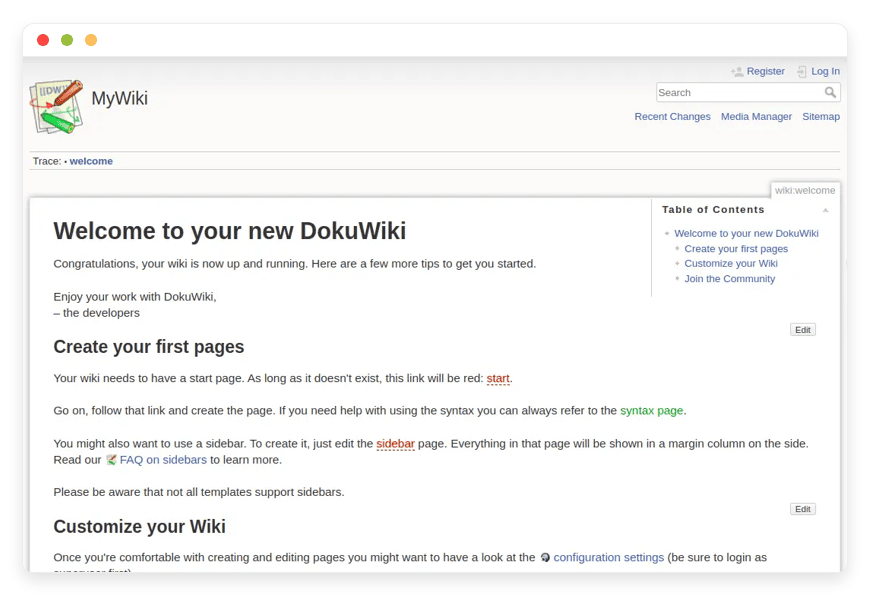
Fast, Simple, and Secure: The Ultimate Guide to Managed DokuWiki Hosting
TLDR: Quick Answer
DokuWiki is a highly versatile open-source wiki application. It operates entirely without a database, storing all your text data in simple, readable files. Opting for Managed DokuWiki Hosting gives you the immediate value of this powerful documentation tool without the heavy technical overhead.
No Database Needed: Stores information in plain text files for easy administration and unmatched speed.
Built-In Access Control: Granular permissions keep your private internal knowledge base completely secure.
Complete Version History: Tracks every single change so you can easily revert to older document versions.
Massive Extensibility: Access thousands of community-built plugins and templates to customize your workspace.
Zero Maintenance: A managed setup handles backups, updates, and performance optimization automatically.
Introduction
Documentation often becomes a messy, disorganized afterthought for many teams. You have text files scattered across local folders and cloud drives. Finding a specific process document or technical manual takes far too long. A dedicated wiki centralizes that knowledge. It makes information accessible, searchable, and easy to update for your entire team.
But running it yourself is a second job. You have to configure the server, handle security updates, and fix broken PHP environments. You spend your weekend troubleshooting error logs instead of actually writing documentation.
DANIAN acts as your invisible infrastructure. We run the backend so you can focus on building your knowledge base. You get a fast, secure, and optimized environment straight out of the box.
What is DokuWiki?
DokuWiki is a simple yet incredibly powerful wiki application. Created in 2004 by Andreas Gohr and maintained by a vibrant global community, it stands out for its unique and highly effective architecture. It does not require a complex database like MySQL or PostgreSQL. Instead, it saves all your pages as standard plain text files directly on the server.
This file-based approach makes it incredibly fast and easy to back up. It features a clean, readable syntax that helps users format text quickly without fighting a slow visual editor. DokuWiki includes built-in access controls and authentication connectors out of the box. These specific tools make it highly useful for both public websites and secure corporate environments. With over 50 supported languages and thousands of available plugins, it adapts to nearly any documentation need.
Why is it trending?
People are tired of complex, heavy software applications. Maintaining a database adds unnecessary overhead for simple text documentation. DokuWiki is trending because it provides a lightweight, highly efficient alternative. It runs smoothly on minimal server resources. Teams appreciate the raw simplicity of plain text storage. If the server crashes, your files remain intact and readable in any standard text editor. It strips away the bloat and focuses entirely on fast, collaborative writing.
Why Choose DokuWiki?
Proprietary documentation tools often trap your content. They force you into rigid payment tiers and make exporting your files incredibly difficult. Choosing DokuWiki gives you complete open-source freedom. Your files are saved as standard text documents. You control the environment and the content structure entirely.
Hosting DokuWiki replaces the need for expensive tools like Confluence or Notion for standard documentation. You get similar collaborative features without the recurring per-user fees. The built-in access control lists let you restrict specific pages to certain user groups easily. You can create public-facing manuals and private internal notes on the exact same platform. The community plugins allow you to add exactly what you need, from visual editors to complex diagram tools. This modular approach keeps the core software incredibly fast.
Key Features of DokuWiki
DokuWiki packs a significant punch for a tool without a database. It offers everything a modern team needs to manage information effectively and securely. Here is a deep dive into the mechanics that make it work so well.
Plain Text File Storage
All pages save as .txt files directly in a designated folder. This means your text is always readable, even outside the wiki interface. You can easily read, copy, or move files using a standard file manager. It vastly simplifies disaster recovery and long-term archiving. You do not have to worry about corrupted database tables destroying your hard work.
Granular Access Control Lists (ACL)
You control exactly who sees what in your wiki. You can set permissions at the overarching namespace level or the individual page level. You easily create groups for admins, editors, and guests. This ensures sensitive internal documents remain hidden from public visitors. You define exactly who can read, edit, create, or upload files within specific sections.
Comprehensive Revision Control and History
Mistakes happen constantly in collaborative environments, but they are easy to fix here. DokuWiki saves a complete history of every page edit in a background archive. You can view previous versions and compare changes side-by-side. The software highlights exact text differences in color. You can restore old, deleted content with a single click.
Simple Formatting Syntax
Writing is extremely fast. You use a straightforward syntax for bold text, headers, links, and lists. You do not have to take your hands off the keyboard to click menu buttons. If your team prefers a more visual approach, you can install a WYSIWYG editor plugin from the directory. This keeps both developers and non-technical staff happy and productive.
Easy Media and File Management
You upload images, videos, and PDF files directly through the wiki interface. The media manager keeps all your files organized by namespace. You can insert these files into your text easily. You can even resize images on the fly using simple syntax commands like adding a pixel width next to the image name. This keeps your visual documentation clean.
Extensive Extension Manager
Over 1,400 community plugins exist to extend the core functionality. You search for and install these plugins directly from the web administration panel. You never have to touch a command-line interface to add new features. You can add syntax highlighters for code, interactive charts, and user discussion forums in seconds.
Authentication Backends
Native DokuWiki uses its own simple text file to manage usernames and passwords. However, corporate environments require centralized logins. You can install authentication plugins to connect DokuWiki to external systems. It easily connects to LDAP directories, Active Directory, or custom application user tables. Your staff can use their existing company passwords to log in.
Automatic Draft Saving
Web browsers crash. Laptops lose power unexpectedly. DokuWiki prevents massive data loss by running a background timer while you type. It saves a local draft of your work continuously. When you return to the page later, DokuWiki alerts you and asks if you want to recover your unsaved work. You never lose a long technical article again.
Fast and Powerful Search
Finding old information must be instant. DokuWiki automatically builds a hidden search index of every single word you write. When you type in the search bar, it scans this index and instantly finds the relevant pages. It highlights your search terms directly in the text. It functions exactly like a personal search engine for your company knowledge.
Customizable Templates and Themes
The visual look of your wiki is completely separate from the written content. You can install new design templates to match your corporate branding perfectly. You can change colors, adjust layout widths, and upload custom logos directly from the configuration manager. The community offers dozens of modern, mobile-responsive themes for free.
Section Editing for Large Pages
Massive text documents become very hard to manage. DokuWiki solves this automatically. It adds small "Edit" buttons next to every header on the page. You click it, and the editor only loads that specific paragraph. This prevents two users from causing massive edit conflicts on a large company manual. It also saves you from endless scrolling.
Multilingual Interface Support
The core DokuWiki interface supports translation into over 50 different languages. If you run a global team, each user can set their preferred language in their personal profile settings. The admin panel, navigation buttons, and system error messages will instantly translate for them. This creates a highly accessible environment for international collaboration.
Automatic Table of Contents
Long documents organize themselves automatically without any extra effort. You simply type your headers using standard equal signs. DokuWiki reads these headers and builds a neat, clickable table of contents at the top of the page. Readers can click a specific link and jump straight to the relevant section immediately.
Solutions per Industry
DokuWiki is highly adaptable. Different sectors use its core features to solve vastly different organizational problems.
Software Development and IT Operations
Technical teams constantly suffer from scattered runbooks and outdated API documentation. A developer writes a deployment script and leaves it on their local machine. When a server fails, the rest of the team panics trying to find the fix. DokuWiki provides a fast, central hub. Developers use the specific code syntax to paste their scripts. The syntax highlighter plugin makes the code perfectly readable. The IT team searches the wiki, finds the correct script instantly, and resolves the issue fast.
Education and Academic Research
Professors manage dozens of classes simultaneously. They need an efficient way to distribute reading lists and track student research progress. DokuWiki allows an instructor to create a separate namespace for every single semester. They set the access control rules so students can only read the syllabus pages. For specific research labs, students get write access to a private namespace. They use this area to log their daily experiments and collaborate safely.
Creative and Digital Agencies
Creative agencies handle branding and design for multiple clients at once. A designer needs the exact hex codes and specific logo files for a particular brand. Finding these assets hidden deep in a chat history is highly inefficient. DokuWiki acts as the perfect client portal. Each client gets a dedicated namespace. The media manager securely stores the high-resolution logos. The text pages hold the specific hex codes and typography rules for instant reference.
Law Firms and Legal Practices
Lawyers process massive amounts of case history daily. They draft standard contracts and maintain strict internal procedures. Document security is the main priority for a firm. DokuWiki solves this problem through its highly strict access controls. The managing partners create a secure internal namespace. Only specific, verified user groups can read the sensitive internal procedures. The plain text storage format guarantees these legal documents remain accessible decades from now.
Manufacturing and Hardware Engineering
A busy factory floor relies on precise safety manuals and complex machine operating procedures. Paper manuals get lost, stained, or destroyed easily. A digital manual needs to be fast and highly searchable. DokuWiki runs perfectly on the low-end tablets typically used on a shop floor. A maintenance worker types a specific machine part number into the search bar. They instantly find the exact maintenance manual and safety protocols needed to fix the machine.
Non-Profit Organizations
Non-profits run on incredibly tight budgets. They rely heavily on volunteers. When a volunteer leaves, their critical organizational knowledge usually leaves with them. Commercial software subscriptions drain vital fundraising funds. DokuWiki provides a completely free, highly effective solution. The organization documents their exact fundraising procedures and event planning checklists. New volunteers read the wiki and get up to speed in days instead of weeks.
Accounting and Financial Planning
Tax codes change dramatically every single year. Accounting firms must update their internal audit procedures constantly to remain compliant. They need to know exactly when a rule changed and who verified that change. DokuWiki provides a flawless, immutable revision history. An auditor edits a specific tax procedure page. The management firm can look back at the history log to see the exact date the new tax rule was applied to their internal process.
Remote Work Consultancies
Distributed teams cannot rely on tapping someone on the shoulder to ask a quick question. They work across different time zones constantly. Asynchronous communication requires perfect written documentation. A remote consultant writes a detailed project proposal in DokuWiki. Another consultant logs in eight hours later on the other side of the world. They review the draft and use the section editing feature to refine specific paragraphs without locking the entire document.
DokuWiki vs Other Softwares
Comparing DokuWiki to other documentation platforms highlights its unique file-based approach. It strips away the complex database requirements common in other tools.
| Feature | DokuWiki | Confluence (Proprietary) | MediaWiki (Open Source) |
Storage Backend | Plain Text Files | Relational Database | Relational Database |
System Resources | Very Low | High | Medium |
Setup Complexity | Simple | Complex | Moderate |
Access Control | Native & Granular | Native & Granular | Requires Plugins |
Pricing Model | Free Open-Source | Per-User Monthly Fee | Free Open-Source |
Use Cases and Applications
DokuWiki adapts to fit the specific shape of your organizational needs. Here are practical examples of how teams apply it daily.
Corporate Intranet Portal: Create a central internal hub for employee handbooks, holiday schedules, and company policies. Use the granular access controls to keep HR documents entirely private while sharing general company updates publicly.
Comprehensive Software Documentation: Build massive user manuals for your specific software applications. Use the syntax highlighter to display clean code examples. Connect pages easily to guide users through complex onboarding tutorials.
Personal Knowledge Base: Start a private digital notebook for your specific personal projects. Document your complex home network setup, family recipes, or academic research notes. The fast search function makes finding old notes instant.
Standard Operating Procedure (SOP) Hub: Document the exact steps required to complete daily business tasks. Create a simple checklist format. New hires read these SOPs to learn their daily responsibilities without constantly interrupting senior staff.
Community and Hobby Portals: Run a public wiki for a specific hobby group or online gaming clan. Allow trusted members to register and contribute to strategy guides. Keep administrative control over the main structure and visual layout.
How DANIAN Helps
Running server software takes considerable time and technical patience. DANIAN acts as your quiet enabler. We handle the mess in the background, and you get the glory of a perfect, fast wiki.
Fully Managed: We handle the hosting completely. Our experienced team manages everything from initial setup to regular updates, security patches, and daily performance monitoring. Your software is always optimized without you having to lift a finger.
Backup & Monitoring: Automated daily backups are configured automatically, stored securely off-site, and allow for a quick one-click restore if you ever make a critical mistake.
SSL & Firewall: Secure by default. With cybersecurity threats on the rise globally, we take security seriously. From automated backend updates to proactive network monitoring and custom firewalls, we make sure your environment is secure 24/7.
Updates: Critical security patches and new software versions are applied directly without your intervention. Your wiki stays safe from newly discovered vulnerabilities automatically.
24/7 Monitoring: Potential software issues are detected and often resolved before you even notice a slowdown. We keep the engine running smoothly around the clock.
Guaranteed Performance: Application downtime can be detrimental to your business operations. With our highly scalable infrastructure, we ensure consistent, fast performance even as your active user base grows rapidly.
7-Day Free Trial: No financial risk. Less setup, more development time for your actual work. Affordable from the start. You get real help from our support team when you need it.
How to Get Started
You can get running with your new, fully managed wiki in just a few minutes.
Visit danian.co and sign up for a quick account.
Select DokuWiki directly from the software catalog.
Relax while DANIAN launches your software in the background.
FAQ
Does DokuWiki require a standard database?
No. It stores all text, revisions, and media as standard plain text files directly on the server. This eliminates the need for MySQL.
Is the core DokuWiki software actually free?
Yes. It is entirely open-source software. You only pay for the managed hosting environment that runs the software.
How exactly do I install new plugins?
You install plugins directly through the DokuWiki web administration panel using the Extension Manager. You do not need command-line access.
Can I restrict access to certain private pages?
Yes. The built-in Access Control Lists (ACL) allow you to restrict read and write access for specific users or user groups easily.
How do I migrate my existing DokuWiki to DANIAN?
Because it uses plain text files, migration is as simple as copying your data and conf folders to the new server. Our support team can assist with this process directly.
Can I use my own custom domain name?
Yes. You can connect any custom domain name to your hosted environment quickly and easily through our dashboard.
What happens if I make a massive mistake while editing a page?
DokuWiki keeps a permanent history of all page revisions. You can restore an older, correct version of any page with a few simple clicks.
Can I use a visual editor instead of typing code?
Yes. If you dislike the standard text syntax, you can easily install a WYSIWYG editor plugin from the extension manager.
Are the daily backups easy to read offline?
Yes. Because the backups consist of standard text files and images, you can extract the backup file and read your wiki pages on your local computer instantly.
Conclusion
DokuWiki proves that you do not need highly complex databases to build a incredibly powerful, fast knowledge base. Its plain text storage architecture, robust access controls, and vast plugin library make it the absolute ideal tool for professional documentation. It stays out of your way and lets your team focus entirely on writing excellent content.
Experience the power of fully managed open-source software.


