
Managed DocuSeal Hosting: The Ultimate Guide to Open-Source Signatures
TLDR - Quick Answer
DocuSeal is a powerful open-source platform for creating, filling, and signing digital documents. It replaces expensive, restrictive eSignature tools with a flexible system you control. Opting for Managed DocuSeal Hosting gives you the immediate value of this platform without the technical burden of maintaining servers.
Zero Server Setup: Skip the command line entirely and get running in minutes.
Predictable Costs: Avoid the per-envelope pricing models of traditional signature software.
Complete Privacy: Keep your sensitive contracts and agreements under your direct control.
Automated Maintenance: Enjoy automatic backups, security updates, and monitoring without lifting a finger.
Deep Integration: Embed signing forms directly into your own website or application.
Introduction
Digital signatures run the modern world. If you want to close a sale, hire an employee, or finalize a contract, you need a quick way to sign a PDF. But relying on traditional software often means paying steep monthly fees. These fees increase rapidly every time you send a few extra documents to your clients.
Setting up an open-source alternative solves the cost problem entirely. But running it yourself is a second job. You have to configure databases, manage SSL certificates, and constantly check for security patches. If your server goes down right before a client signs a major contract, you lose valuable time and money. You also risk damaging your professional reputation.
This is where DANIAN steps in as your invisible infrastructure. We handle the messy technical details so you can focus entirely on your business. You build the workflow, and we make sure the foundation never cracks
What is DocuSeal?
DocuSeal is an open-source platform built specifically for document signing and processing. It provides a simple, API-driven way to create fillable PDF forms and collect digital signatures. Created by the dedicated DocuSeal core team, it gives developers and businesses a powerful toolkit to handle complex document workflows.
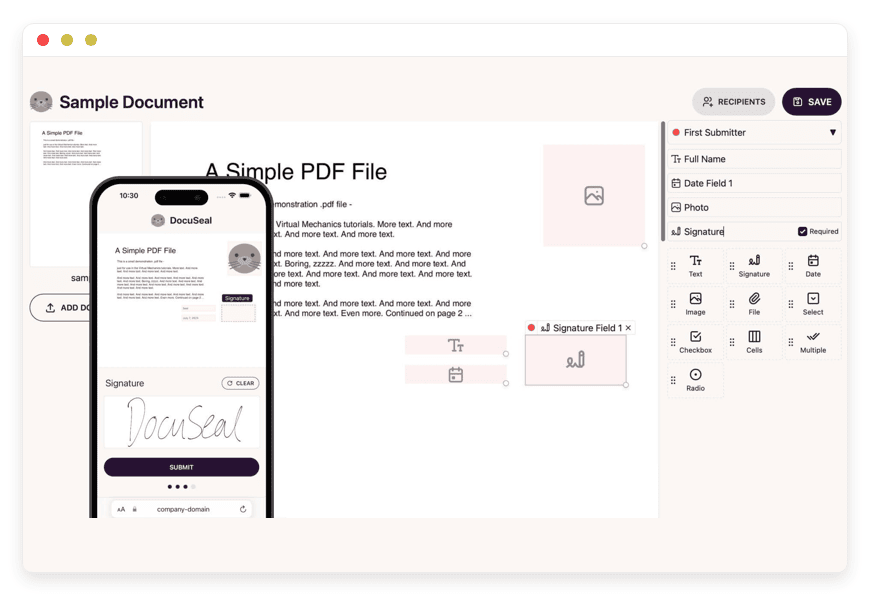
The software includes an intuitive visual document builder. You can upload an existing PDF, add signature fields, and send it directly to clients. It also provides deep integration options for popular web frameworks like React, Vue, Angular, Next.js, and WordPress. Furthermore, it supports backend languages including PHP, Python, Ruby on Rails, Java, C#, and Kotlin. This makes it an essential tool for any business that processes paperwork digitally.
Why is it trending?
DocuSeal is trending because it treats document signing as a fundamental building block, not a walled garden. Developers love it because they can embed the signing process directly into their own applications using a simple iframe. Businesses love it because it eliminates the hidden fees and strict limits found in typical software agreements. It is legally binding under major electronic signature laws. It is easy to use, and it scales perfectly with high-volume requirements.
Why Choose DocuSeal?
Choosing DocuSeal means taking back control of your operations. Traditional signature platforms charge you for every single document you send. They restrict API access behind high-tier paywalls. They force your users to leave your website to sign a simple form. This breaks your brand experience and causes confusion.
Hosting DocuSeal gives you open-source freedom. You get full access to a powerful API from day one. You can send as many documents as you need without watching a counter tick down. You can customize the experience so that clients sign documents directly inside your own dashboard. It transforms document signing from a high-cost external service into a seamless, internal feature.
Key Features of DocuSeal
DocuSeal is packed with tools designed to streamline how you handle paperwork. The platform goes far beyond simple signature collection. Below is a deep dive into the features that make it stand out.
Seamless Application Embedding
Instead of sending your clients to a third-party website via an email link, DocuSeal allows you to embed the entire signing process directly into your application. Whether you use React, Vue, Next.js, Angular, or plain HTML, you can drop a few lines of code and display the document. The workflow benefit here is immense. Your clients stay on your website. This maintains brand consistency and increases the chances they will complete the form immediately.Drag-and-Drop Document Builder
You do not need to be a developer to create templates. DocuSeal includes an intuitive visual builder. You simply upload your standard PDF file. Then, you drag text boxes, date fields, checkboxes, and signature lines onto the page. You can assign different colors to different signers to avoid confusion. This saves hours of administrative work. Once you build a template, your team can reuse it infinitely with just a few clicks.Robust API and Webhooks
DocuSeal takes an API-first approach to document management. You can trigger document creation, check signature status, and download completed PDFs programmatically. The webhook system actively notifies your application the moment a document is signed. This means your workflow never pauses. For example, once a client signs a proposal, the webhook can automatically trigger your billing software to generate an invoice without human intervention.Automated Signature Routing
Many documents require more than one signature. A contract might need approval from a manager, a legal representative, and a client. DocuSeal handles complex routing with ease. You can define a specific serial order for signers. The software automatically emails the first person, waits for their signature, and then immediately forwards the document to the second person. This completely eliminates the need for manual follow-ups and lost email threads.Mobile-Optimized Signing Experience
A large portion of modern business happens on phones. DocuSeal ensures that documents format perfectly on small screens. Signers can easily draw their signature with a finger or type their name on any mobile device. The interface adapts cleanly to different resolutions. This reduces friction and speeds up the time it takes to get a final, binding signature from clients who are on the move.Integrated Payment Collection
Closing a deal often means getting a signature and a payment at the exact same time. DocuSeal supports payment collection right alongside the signature fields. By integrating with payment processors like Stripe, you allow clients to sign an agreement and pay their deposit in one fluid motion. This shortens the sales cycle, reduces billing errors, and significantly improves your overall cash flow.HTML to Fillable PDF Generation
Sometimes you do not have a static PDF ready to go. DocuSeal allows you to generate fillable PDF documents directly from HTML code. This is incredibly powerful for dynamic contracts. If your application calculates specific pricing or generates custom terms based on user input, you can pass that HTML into DocuSeal. It instantly converts the markup into a clean, signable PDF document for your user.Advanced Identity Verification Options
For sensitive documents, a simple drawn signature is not always enough. DocuSeal supports advanced verification methods to ensure the signer is exactly who they claim to be. This includes options like Knowledge-Based Authentication (KBA) and Qualified Electronic Signatures (QES). Implementing these features adds a strong layer of legal protection to your most critical business agreements.Extensive Backend Language Support
DocuSeal does not limit you to JavaScript frameworks. The platform provides comprehensive guides and support for a wide array of backend languages. Whether your application is built on PHP, Python, Ruby on Rails, Java, C#, or Kotlin, you can integrate DocuSeal smoothly. They even support modern mobile frameworks like Flutter, allowing you to build native iOS and Android apps with integrated signing.WordPress Integration
If your business runs on WordPress, DocuSeal offers a straightforward integration path. You can embed signing forms directly into your posts or pages using shortcodes or simple HTML blocks. This is perfect for independent consultants, local service businesses, and bloggers who need a quick way to collect signatures without building a custom web application from scratch.
Solutions per Industry
DocuSeal adapts perfectly to the unique demands of different business sectors. Traditional paperwork slows down operations across every field. Here is how specific industries use this software to solve their distinct problems.
Real Estate and Property Management
Real estate professionals drown in paperwork. A standard lease agreement can easily exceed fifty pages. When a property manager rents out a home, they need signatures from multiple tenants, co-signers, and agency representatives. Printing these massive packets is expensive and highly inefficient.
With DocuSeal, a property management company can digitize their entire leasing process. They upload their standard lease once. When a new tenant is approved, the agent generates a custom link. The tenant receives the lease via SMS, reviews the terms on their tablet, and signs all fifty pages digitally. The automated routing then forwards the lease to the property owner for final approval. The completed PDF is stored instantly in the agency's management system.
eCommerce and Retail
Online retailers often need agreements for wholesale purchases, vendor contracts, or high-value custom orders. Chasing down a manufacturer to sign a supplier agreement via email slows down the supply chain. If a contract is delayed, inventory shipments are delayed.
With DocuSeal, an eCommerce business can automate this entirely. A supplier simply clicks a link in their dedicated onboarding portal. They review the PDF and sign instantly. The webhook notifies the inventory system that the vendor is approved. For high-ticket retail items, merchants can use the integrated payment feature. A customer can sign a custom build order for furniture and pay the 50% deposit on the exact same screen.
Software Development Agencies
Agencies deal with a constant flow of Non-Disclosure Agreements (NDAs), Master Service Agreements (MSAs), and Statements of Work (SOWs). A delayed SOW means a delayed project start. Waiting for a client to find a printer, sign a physical paper, scan it, and email it back wastes days of potential development time.
By integrating DocuSeal into their client portal, an agency can generate an SOW automatically when a project is scoped. The client signs it within the dashboard. Once the signature is recorded, the agency's project management tool unlocks the next phase of work. Developers can start coding immediately. This creates a highly professional, frictionless onboarding experience for high-paying corporate clients.
Human Resources and Recruiting
Hiring a new employee requires a mountain of paperwork. Offer letters, tax forms, direct deposit authorizations, and employee handbooks all need physical signatures. Processing these documents manually causes errors. Forms get lost, signatures are missed, and onboarding is delayed.
HR departments use DocuSeal to bundle these forms into a single digital package. The new hire receives one clean link on their smartphone. They fill out their emergency contacts, type their banking details, and sign the offer letter in ten minutes. Because DocuSeal requires all mandatory fields to be completed before submission, the HR team never receives an incomplete packet again. The employee is ready for their first day instantly.
Finance and Accounting
Accountants and financial planners manage incredibly sensitive documents. During tax season, they must collect hundreds of W-9s, tax return authorizations, and client consent forms. Mailing these documents is slow. Asking clients to navigate a clunky, third-party software portal causes frustration.
DocuSeal allows an accounting firm to embed these specific tax forms directly into their secure client portal. A client logs in to check their tax return status and sees a prompt to sign their authorization form. They review the embedded PDF and sign it securely. The firm can track exactly which clients have signed and which clients need a reminder. This dramatically speeds up processing times during the busiest months of the year.
Education Institutions
Schools and universities handle an immense volume of administrative forms. Think about permission slips for field trips, student enrollment forms, housing agreements, and staff employment contracts. Sending paper forms home with students guarantees that a large percentage will be lost or damaged.
Using DocuSeal, a school district can completely eliminate paper permission slips. The administration creates a digital template for the upcoming trip. They email the link to thousands of parents simultaneously. Parents open the link on their phones, review the details, and sign with their finger. The school's administration dashboard updates in real-time, showing exactly which students are cleared to attend the trip.
Event Management
Organizing a large event involves managing constant legal liabilities. Concert promoters, sports organizers, and fitness centers need attendees to sign liability waivers. When you have a thousand people waiting in line to enter a venue, you cannot ask them to sign physical clipboards. This creates massive bottlenecks at the entrance.
DocuSeal solves this by digitizing the waiver process. Event organizers embed the waiver directly into the online ticket purchasing flow. Customers buy their ticket, read the terms, and sign the document digitally before they ever arrive at the venue. If someone buys a ticket at the door, the staff simply points them to a QR code. The attendee scans the code, signs the waiver on their own device, and walks inside quickly.
Logistics and Transportation
Logistics companies manage massive fleets of drivers. They must handle independent contractor agreements, vehicle inspection reports, and bills of lading. When a new driver is hired in a different state, flying them to an office just to sign paperwork is entirely impractical.
With DocuSeal, a freight company can handle national onboarding remotely. The logistics manager sends the driver an employment packet. The driver signs the contract, uploads photos of their license, and signs the vehicle policy from their truck cabin. For daily operations, dispatchers can use DocuSeal to generate digital bills of lading. The driver hands their tablet to the receiving warehouse manager, who signs for the delivery instantly. The proof of delivery syncs back to headquarters in seconds.
DocuSeal vs Other Softwares
How does DocuSeal compare to standard proprietary tools on the market? Here is a clear breakdown of the functional differences.
You can edit text on your website by double clicking on a text box on your website. Alternatively, when you select a text box a settings menu will appear. your website by double clicking on a text box on your website. Alternatively, when you select a text box
You can edit text on your website by double clicking on a text box on your website. Alternatively, when you select a text box a settings menu will appear. your website by double clicking on a text box on your website. Alternatively, when you select a text box
You can edit text on your website by double clicking on a text box on your website. Alternatively, when you select a text box a settings menu will appear. your website by double clicking on a text box on your website. Alternatively, when you select a text box
| Feature | DocuSeal | Proprietary Alternatives (e.g., DocuSign, PandaDoc) |
Open-Source Base | Yes | No |
Document Limits | Unlimited | Strictly metered per tier |
API Access | Included by default | Locked behind Enterprise plans |
Native UI Embedding | Yes, seamless iframe | Often requires complex redirects |
Cost Structure | Predictable infrastructure cost | Pay-per-user and pay-per-document |
Use Cases and Applications
DocuSeal is highly versatile across daily business operations. Here are practical ways you can apply it immediately.
Automated NDA Execution: Protect your intellectual property instantly. Send a secure link to contractors before a strategy meeting. They sign it on their phone in the lobby, and the PDF routes directly to your secure legal folder.
B2B Sales Contracts: Speed up your closing rates. Your sales team can generate a custom contract, send it via SMS or email, and receive instant alerts the moment the client signs.
Gym Membership Agreements: Eliminate paper at the front desk. New members sign their contract and liability waiver on an iPad. The software automatically emails them a copy for their records.
Internal Expense Approvals: Manage purchase orders and budget requests smoothly. Route documents through multiple department managers for sign-off without ever printing a single piece of paper.
Creative Release Forms: Photographers and video producers can collect model release forms on location. They use their phone to capture signatures before the camera ever starts rolling.
How DANIAN Helps
Managing an open-source platform requires specialized knowledge. You have to maintain the server, apply security patches, and ensure the system stays online during critical business hours. DANIAN acts as your "quiet enabler". We handle the mess behind the scenes, so you get all the glory of a flawless system.
Here is what you get when you choose DANIAN:
Fully Managed: We handle the hosting. Our team manages everything from initial setup to regular updates, security patches, and performance monitoring. Your software is always optimized without you having to lift a finger.
Backup & Monitoring: Automated daily backups are configured automatically and stored securely. If you ever make a mistake, we provide a fast, one-click restore.
SSL & Firewall: Secure by default. With cybersecurity threats on the rise, we take security seriously. From automated updates to proactive monitoring and active firewalls, we make sure your environment is secure 24/7.
Updates: Security patches and new versions are applied without your intervention. Your system is always running the latest code.
24/7 Monitoring: Issues are detected and often resolved before you notice. Our systems watch your resources around the clock.
Guaranteed Performance: Downtime can be detrimental to your business. With our scalable infrastructure, we ensure consistent performance even as your user base grows.
7-Day Free Trial: No risk. Less setup, more development. It is affordable from the start, with real help available when you need it.
How to Get Started
You do not need an IT team to start using DocuSeal. We make the entire process effortless.
Step 1: Visit danian.co and sign up for an account.
Step 2: Select DocuSeal from the software catalog.
Step 3: Relax while DANIAN launches your software.
FAQ
Do I have to pay per signed document?
No. Because you are using an open-source system, there are no artificial limits on how many documents you can send or sign. You can process ten documents or ten thousand without any extra software fees.
How does hosting differ from buying a software license?
When you buy a proprietary license, you rent access to a closed platform. With Managed DocuSeal Hosting, you use free, open-source software. You simply pay for the high-performance infrastructure and expert maintenance required to keep it running smoothly.
Can I connect DocuSeal to my existing website?
Absolutely. DocuSeal is designed for deep integration. You can embed the signing forms into WordPress, React, Vue, Next.js, Angular, or virtually any other web framework using their built-in tools and APIs.
What happens if my DocuSeal instance crashes?
With DANIAN, we monitor your system 24/7. If an issue occurs, our automated systems and technical team intervene immediately to restore service. Your automated daily backups ensure that no signed contracts are ever lost.
Do signers need to create an account?
No. When you send a document, the recipient receives a secure, unique link. They can open the link, review the document, and sign it immediately without having to register or remember a password.
Can I import my existing PDF forms?
Yes. You can upload any standard PDF document into DocuSeal. You then use the intuitive visual builder to lay signature fields, checkboxes, and text boxes precisely where they belong over your original document.
Does DocuSeal support payment collection?
Yes. You can integrate payment processors like Stripe directly into your document workflows. This allows your clients to review a contract, sign it, and submit a payment on the exact same page.
Can multiple people sign the same document?
Yes. DocuSeal supports complex signature routing. You can require multiple signatures on a single document and determine the exact order in which the document is sent to each participant.
Conclusion
DocuSeal is a brilliant tool that fundamentally changes how you process agreements. It strips away the friction of per-document billing and restrictive API limits. By adopting an open-source approach, you ensure your document signing workflow is scalable, deeply integrated, and entirely under your direction.
However, the true value of this software is unlocked when you remove the burden of server management. You should spend your valuable time closing deals and building applications, not troubleshooting database errors or updating server certificates. Let the experts handle the technical infrastructure.
Experience the power of fully managed open-source.


