
Managed Chatwoot Hosting: The Ultimate Open-Source Customer Engagement Suite
TL;DR: The Quick Answer
If you are looking for a modern customer support tool without the monthly cost per agent, Chatwoot is the answer. If you want that tool without the headache of managing servers, DANIAN is the solution.
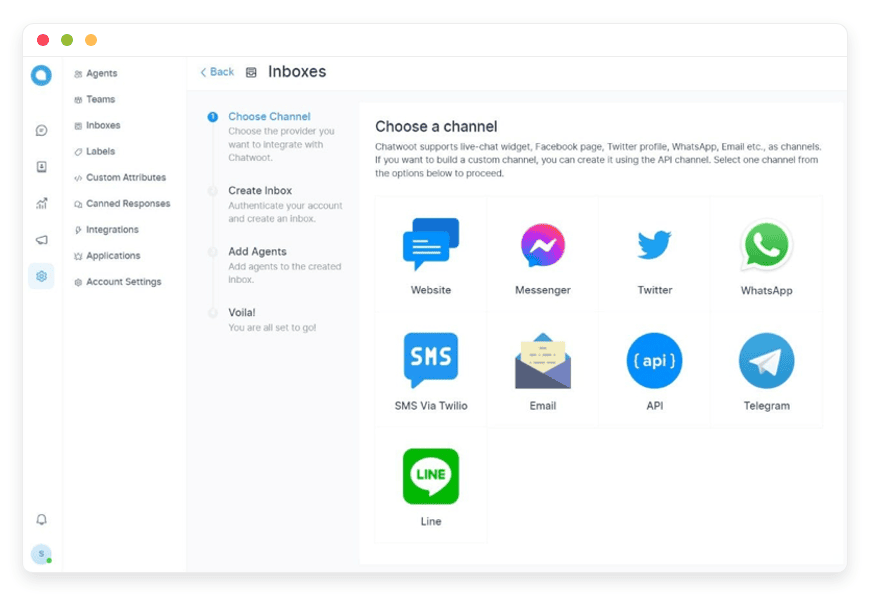
Unified Inbox: Manage WhatsApp, Email, Facebook, Twitter, and Website Chat in one dashboard.
Team Collaboration: Use private notes, mentions, and collision detection to resolve tickets faster as a group.
Automation: Set up chatbots, macros, and logic rules to handle queries while you sleep.
Zero Ops: DANIAN handles the installation, security, and updates.
Introduction
Customer communication is fragmented. Your team likely switches between an email client, a Facebook Business Manager tab, a WhatsApp web interface, and a website live chat widget. It is chaotic, inefficient, and leads to dropped conversations. When a customer asks a question on Instagram and then follows up via email, your team usually has no way of knowing it is the same person. Context is lost, frustration builds, and sales are missed.
Chatwoot solves this by pulling every conversation into a single, sleek interface. It is arguably the best open-source alternative to expensive platforms like Intercom or Zendesk, providing a seamless experience for both the agent and the customer.
However, running Chatwoot yourself is a second job. It requires configuring Redis, PostgreSQL, Sidekiq, and managing storage buckets. You have to handle SSL certificates, SMTP relays, WebSocket connections, and security patches. Instead of helping customers, you end up debugging server logs.
That is where we come in. DANIAN provides the invisible infrastructure. We launch and maintain your Chatwoot environment so you can focus entirely on your customers. You get the software you want, running on high-performance servers, without ever touching a terminal.
What is Chatwoot?
Chatwoot is an open-source customer engagement suite built to provide a holistic view of your customer interactions. Created by a passionate team of developers who believed that high-quality support tools shouldn't be locked behind massive paywalls, Chatwoot has evolved into a powerhouse for businesses of all sizes.
At its heart, Chatwoot is a relationship platform. It serves as a central hub where all external communication channels meet. Whether a customer pings you on Telegram, sends an email to your support address, or replies to a tweet, the ticket arrives in the same place.
Why is it Trending?
The software is gaining massive traction because it prioritizes privacy, speed, and clean design. Unlike legacy support systems that feel clunky and slow, Chatwoot offers a modern, reactive interface built with Vue.js that feels snappy. It allows businesses to maintain strict control over their environment without sacrificing the user experience found in premium SaaS products. It is the choice for companies that have outgrown Gmail labels but aren't ready to spend thousands a month on enterprise software.
Why Choose Managed Chatwoot Hosting?
Choosing Managed Chatwoot Hosting gives you the best of both worlds: the power of enterprise-grade software and the freedom of open-source.
When you opt for a managed solution, you aren't renting a "seat" at a table; you are running your own private environment. This eliminates the "per-agent" pricing models that punish you for growing your team. You can add as many support agents as your server resources allow, making it incredibly cost-effective for scaling organizations. If you hire five temporary staff members for the holiday season, your software bill shouldn't double. With Managed Chatwoot, it doesn't.
Furthermore, self-hosting complex real-time applications is difficult. It involves WebSockets for live updates, background workers for sending emails, and database maintenance for preserving chat history. A managed host absorbs this complexity, ensuring your live chat is actually "live" and not lagging due to server misconfiguration. You get the reliability of a SaaS product with the flexibility of open source.
Key Features of Chatwoot
Chatwoot is packed with features designed to reduce response times and increase customer satisfaction. This is not just a "chat box"; it is a comprehensive workflow tool. Here is a deep dive into what you get when you launch this software.
1. Omnichannel Support
This is the core strength of the platform. You can connect a vast array of channels, ensuring you meet your customers where they are comfortable:
Website Live Chat: A fully customizable widget that sits on your site. It supports pre-chat forms to gather info before the conversation starts, and it maintains history so returning visitors can see past chats.
Facebook & Instagram: Connect your business pages directly. Comments and DMs flow into the dashboard, allowing you to reply instantly without logging into Meta's complex Business Suite.
WhatsApp Business: Through integration with API providers, you can handle WhatsApp conversations. This is vital for markets where WhatsApp is the primary mode of communication.
Twitter/X: Monitor mentions and DMs. You can reply to tweets directly from Chatwoot, moving public complaints to private resolutions quickly.
Email Forwarding: You don't need to abandon email. Chatwoot generates an inbound email address. You forward your support@company.com emails to it, and they appear as tickets. Replies sent from Chatwoot look like normal emails to the customer.
SMS & Telegram: Integrate with providers like Twilio or use the Telegram bot API to handle mobile-first customers.
2. The Unified Shared Inbox
Every conversation from the channels above lands in the Shared Inbox. This interface is designed for high-volume handling:
Rich Text Editor: Agents can use bold, italics, lists, and code blocks to format replies clearly.
Collision Detection: If two agents try to reply to the same ticket, Chatwoot warns them. This prevents the embarrassing situation of sending two different answers to the same customer.
Typing Indicators: See when a customer is typing in real-time, allowing agents to prepare their answers before the message is even sent.
Conversation Continuity: Even if a user leaves your website, you can continue the conversation via email if their address was captured. The thread remains unbroken in your dashboard.
3. Advanced Team Collaboration
Support is a team sport. Chatwoot includes tools to prevent agents from working in silos:
Private Notes: Agents can leave internal notes on a ticket that the customer cannot see. This is perfect for asking a manager for help on a complex issue or leaving a "handover" note for the next shift.
Mentions: You can tag specific team members (@john) to draw their attention to a ticket. They receive a notification instantly.
Teams and Departments: Organize your agents into groups like "Sales," "Technical Support," or "Billing." You can then route conversations specifically to these groups, keeping your inbox organized.
4. Automation and Chatbots
Reduce manual work with powerful automation features that work 24/7:
Interactive Chatbots: Integrate with Dialogflow or use simple interactive message flows (options menus) to handle FAQs. A bot can triage the issue ("Do you need Sales or Support?") before a human agent is ever notified.
Automation Rules: Create "If This, Then That" logic.
Example: "If a message contains the word 'Refund', assign it to the Billing Team and add the label 'High Priority'."
Example: "If the user's browser language is Spanish, assign the chat to the Spanish Team."
Business Hours: You can't be online forever. Configure operating hours for different inboxes. Outside these hours, Chatwoot can automatically hide the widget or send a custom "We are away" message.
5. Canned Responses (Macros)
Speed is quality. Agents often answer the same five questions repeatedly.
Shortcodes: Agents can save common answers (e.g., "How to reset password") and insert them by typing a shortcode like /reset.
Consistency: This ensures that every agent speaks with the same voice and provides the same accurate information, regardless of their tenure at the company.
6. Robust Reporting and Analytics
You cannot improve what you do not measure. Chatwoot provides detailed visual reports to help managers make decisions:
Conversation Reports: Track incoming volume over time to identify peak hours and staffing needs.
Agent Reports: Measure response times and resolution rates per agent. Identify who is performing well and who needs training.
CSAT Reports: Gather customer satisfaction ratings. After a conversation is resolved, the user is asked to rate the interaction.
Label Reports: Understand what your customers are talking about. If the "Bug" label volume spikes, you know you have a product issue.
7. Integrations and Webhooks
Chatwoot plays nicely with your existing stack:
Slack Integration: Receive notifications about new conversations directly in a Slack channel. You can even reply to customers from within Slack.
Webhooks: Push data to other systems when events happen. For example, when a new contact is created in Chatwoot, a webhook can send that data to your CRM.
Dashboard Apps: You can embed external applications inside the Chatwoot sidebar. This means an agent can see a customer's order history from your Shopify store right next to the chat window.
Solutions per Industry
Chatwoot is industry-agnostic, but its feature set solves specific problems for different sectors uniquely. Here is how different industries utilize the software.
1. eCommerce and Retail
For online stores, response time is directly correlated with conversion rates. A hesitation at checkout often results in an abandoned cart.
The Scenario: A customer is browsing a high-ticket item but is unsure about the warranty terms. They are staring at the "Buy Now" button but need one question answered.
The Workflow: They click the Chatwoot widget. Because of the "Pre-Chat Form," they enter their order ID or email. The agent sees the message immediately, along with the context that the user is currently on the "Product X" page. The agent uses a "Canned Response" to explain the warranty instantly.
The Result: The doubt is removed, and the sale is completed. Later, the system automatically sends a shipping update via WhatsApp integration.
2. Digital Marketing Agencies
Agencies often manage support for multiple clients, which is usually a logistical nightmare involving logging in and out of different accounts.
The Scenario: You manage the social media and website support for a dentist, a local gym, and a law firm.
The Workflow: Chatwoot allows you to create multiple "Inboxes" within a single installation. You can segregate client communications completely. You create a "Dentist Team" and a "Gym Team" of agents.
The Result: You manage all clients from one URL. The dentist's patients never see the gym's branding, and your agents never mix up the conversations. You provide a white-label support experience without the overhead of multiple tools.
3. Education and EdTech
Educational institutions deal with admissions, student support, and technical issues simultaneously. The volume spikes massively during enrollment periods.
The Scenario: It is admission week. The university website is flooded with thousands of students asking "What is the deadline?" and "How do I upload my ID?". The phone lines are jammed.
The Workflow: You implement a Chatwoot interactive chatbot. When a student opens the chat, they are presented with options: "Admissions," "Technical Support," or "Counseling." If they click "Admissions," the bot answers the deadline questions automatically using logic rules. Only complex, emotional queries are routed to the human counseling team.
The Result: The manual workload drops by 60%, allowing staff to focus on students who actually need guidance, not just information.
4. SaaS and Software Startups
For technical products, support isn't just about being polite; it's about debugging.
The Scenario: A user encounters a bug in your software. They need to send screenshots and code snippets to explain the issue.
The Workflow: The user pastes code blocks into the Chatwoot widget (which supports markdown). Your Level 1 support agent sees the ticket but cannot solve it. They use the "Private Note" feature to tag a developer: "@Dave, can you check this error log?" Dave checks it, replies in the private note, and the agent relays the fix to the user.
The Result: A technical issue is resolved without the user ever being bounced around or asked to "email the dev team." The experience feels seamless.
5. Hospitality and Travel
Hotels and travel agents thrive on personalization. The guest experience starts before they arrive.
The Scenario: A guest books a room but forgets to ask for a crib for their toddler. They message the hotel's Facebook page.
The Workflow: The message arrives in Chatwoot. The concierge sees the request. They check the booking system (integrated via sidebar app), confirm the dates, and tag the "Housekeeping Team" in the conversation. They reply to the guest on Facebook, "All set! The crib will be in your room."
The Result: The guest feels taken care of on their preferred platform. The housekeeping team is notified instantly without a phone call.
6. Real Estate
Real estate is a high-stakes, speed-based industry. Agents need to capture leads the moment they show interest.
The Scenario: A potential buyer is looking at a property listing at 8:00 PM. They want to schedule a viewing.
The Workflow: They click "Chat Now." Since it is after hours, the Chatwoot "Business Hours" logic kicks in. Instead of silence, the bot replies: "Our agents are offline, but please leave your phone number and preferred viewing time, and we will text you by 9:00 AM tomorrow."
The Result: The lead is captured rather than lost to a competitor. The next morning, the agent sees the ticket, clicks the phone number, and sends an SMS via Chatwoot to confirm the appointment.
7. Financial Services and Fintech
Trust is the currency here. Customers need to know they can reach a human immediately if they suspect fraud or have a banking issue.
The Scenario: A user notices a strange transaction and panics. They log into their banking app.
The Workflow: They use the in-app chat (via Chatwoot mobile SDK). The conversation is automatically labeled "Urgent" based on keywords like "Fraud" or "Stolen." Chatwoot's "Assignment Rules" route this immediately to the Senior Risk Team, bypassing the general support queue.
The Result: The customer gets immediate help during a stressful moment, significantly increasing trust and retention.
Chatwoot vs. Proprietary Alternatives
How does Chatwoot stack up against the giants of the industry like Intercom, Zendesk, or Drift? The difference is usually in philosophy and pricing structure rather than feature capability.
| Feature | Chatwoot | Proprietary Alternatives |
| Source Code | Open Source | Closed / Proprietary |
| Pricing Model | Infrastructure-based (Flat) | Per Agent / Per Month |
| Data Control | High (Private Environment) | Low (Hosted on their shared cloud) |
| Omnichannel | Included in Core | Often requires expensive add-ons |
| Customization | High (API access) | Limited to their marketplace |
| Agent Limit | Unlimited (Resource dependent) | Strict pay-per-seat limits |
| Database Access | Direct access possible | No direct access |
The "Per-Agent" Trap
The most significant difference is the pricing model. Proprietary software effectively taxes you for growing. If you want to add a manager to the support tool just so they can read reports, you have to pay for a full seat. With Managed Chatwoot, you are paying for the server, not the people. You can grant access to your entire company—sales, marketing, dev, and support—without increasing your monthly invoice by a cent. This encourages better collaboration across the whole organization.
Use Cases and Applications
Beyond standard customer support, Chatwoot is versatile enough for various roles within an organization.
1. Sales CRM Lite
While Chatwoot isn't a dedicated CRM like Salesforce, it functions brilliantly as a "Lite" CRM for small to medium businesses. You can use "Contact Segments" to filter users based on their activity. For example, create a segment for "Active Leads" (people who have messaged in the last 7 days). Your sales team can work through this list, sending follow-up emails directly from the dashboard. The "Labels" feature allows you to tag conversations as "Qualified," "Negotiating," or "Closed Won," giving you a visual pipeline of your sales chats.
2. Internal Helpdesk
Large companies can use Chatwoot for internal IT or HR support. Instead of external customers, the "users" are your own employees.
Application: Embed the chat widget on your company intranet.
Workflow: When an employee forgets their password or needs a new monitor, they chat with the IT team. The IT team uses Chatwoot to triage requests, separating hardware issues from software access requests. This keeps the internal email load down and provides a faster resolution for employees.
3. Community Management
If you run a Discord server, a Telegram group, or a membership site, managing the community can be overwhelming.
Application: Route your community platforms into Chatwoot.
Workflow: Moderators can use Chatwoot to track disputes or answer membership questions. If a user is banned or reports harassment, the conversation is logged permanently in Chatwoot, providing an audit trail that doesn't disappear if a Discord server is deleted or a message is unsend.
4. Multilingual Support Hub
For global companies, language barriers are a major hurdle.
Application: Chatwoot's dashboard supports multiple languages.
Workflow: You can have a team in Brazil using the dashboard in Portuguese, while your team in Germany uses it in German. The customers see the widget in their local language. Automation rules can route Portuguese messages to the Brazil team automatically, ensuring no one ever opens a ticket they cannot read.
How DANIAN Helps
At DANIAN, we act as the "Quiet Enabler." We believe that the best infrastructure is the kind you never have to think about. You get the full glory of a professional support system, while we handle the messy backend. We believe you should spend your time training your support team, not configuring Linux firewalls.
Here is what our Managed Service covers:
Fully Managed: We handle the hosting from top to bottom. Our team manages the initial setup, regular updates, security patches, and performance monitoring. Your software is always optimized without you lifting a finger. When Chatwoot releases a new version with cool features, we upgrade your instance so you can use them immediately.
Backup & Monitoring: We configure automated daily backups and store them securely off-site. If you delete a critical conversation by accident, we can restore it. We also monitor uptime 24/7, often resolving hiccups before you even notice them.
SSL & Firewall: Security is not optional. We implement custom firewalls and automated SSL certificate renewal to ensure your customer data remains secure during transmission. Your customers trust you with their data; we ensure you can honor that trust.
Guaranteed Performance: Downtime kills trust. If a customer tries to chat and the widget doesn't load, they leave. We run your software on scalable infrastructure designed to handle traffic spikes, ensuring your chat widget loads instantly, every time.
7-Day Free Trial: We are confident in our services. You can test the speed and reliability of our Chatwoot service at no risk.
How to Get Started
Getting your own Chatwoot environment running takes less time than making a cup of coffee. We have stripped away the complexity of Docker containers and command lines.
Visit DANIAN: Go to our signup page.
Select Chatwoot: Choose Chatwoot from our catalog of open-source applications.
Launch: Click start. Our automation will provision the server, configure the database, set up the Redis queues, secure the connection, and initialize the mailer services.
Then, you will receive your login credentials. You can immediately log in, invite your team members, and paste the widget code onto your website.
FAQ
1. Is this the full version of Chatwoot?
Yes. You get the full Community Edition of Chatwoot with all the features listed above, including omnichannel inboxes, reporting, API access, and team management tools.
2. Can I use the Mobile Apps with Managed Hosting?
Absolutely. You simply download the official Chatwoot app from the iOS App Store or Google Play Store. When prompted for the "Server URL," you enter your custom DANIAN URL. You can then log in with your credentials and chat on the go.
3. How is this different from paying Chatwoot.com directly?
Chatwoot.com offers a SaaS service which is excellent. DANIAN offers Managed Hosting. This means you have your own private environment. This is often more cost-effective for larger teams and provides greater isolation for your data. You are not sharing resources with thousands of other companies.
4. Can I migrate my data later?
Yes. Since you control the installation, you can export your data. We support open standards, so you are never stuck. If you decide to move to a self-hosted server in your own basement later, you can take your data with you.
5. Do you handle email configuration?
Yes. Chatwoot requires an SMTP server to send emails (like password resets or conversation transcripts). We pre-configure this for the system emails so the platform works out of the box.
6. Is there a limit on the number of conversations?
Unlike some SaaS plans that charge per "Monthly Active User" (MAU), our hosting plans are based on server resources. You can have unlimited conversations as long as the server size you choose can handle the volume. For 90% of businesses, the standard plan handles massive volume without issue.
Conclusion
Your customers expect immediate answers. They want to reach you on WhatsApp while they are on the bus, on Twitter when they are frustrated, and on your website when they are at their desk. They expect you to know who they are, regardless of the channel they use.
Chatwoot provides the technology to make this happen seamlessly. It unifies the chaos of modern communication into a single, manageable stream. But having the software is only half the battle; ensuring it runs smoothly, securely, and reliably is the other half.
Don't let technical hurdles stop you from providing world-class support. You don't need a DevOps engineer to run a professional support suite; you just need the right partner.
Experience the power of fully managed open-source.


